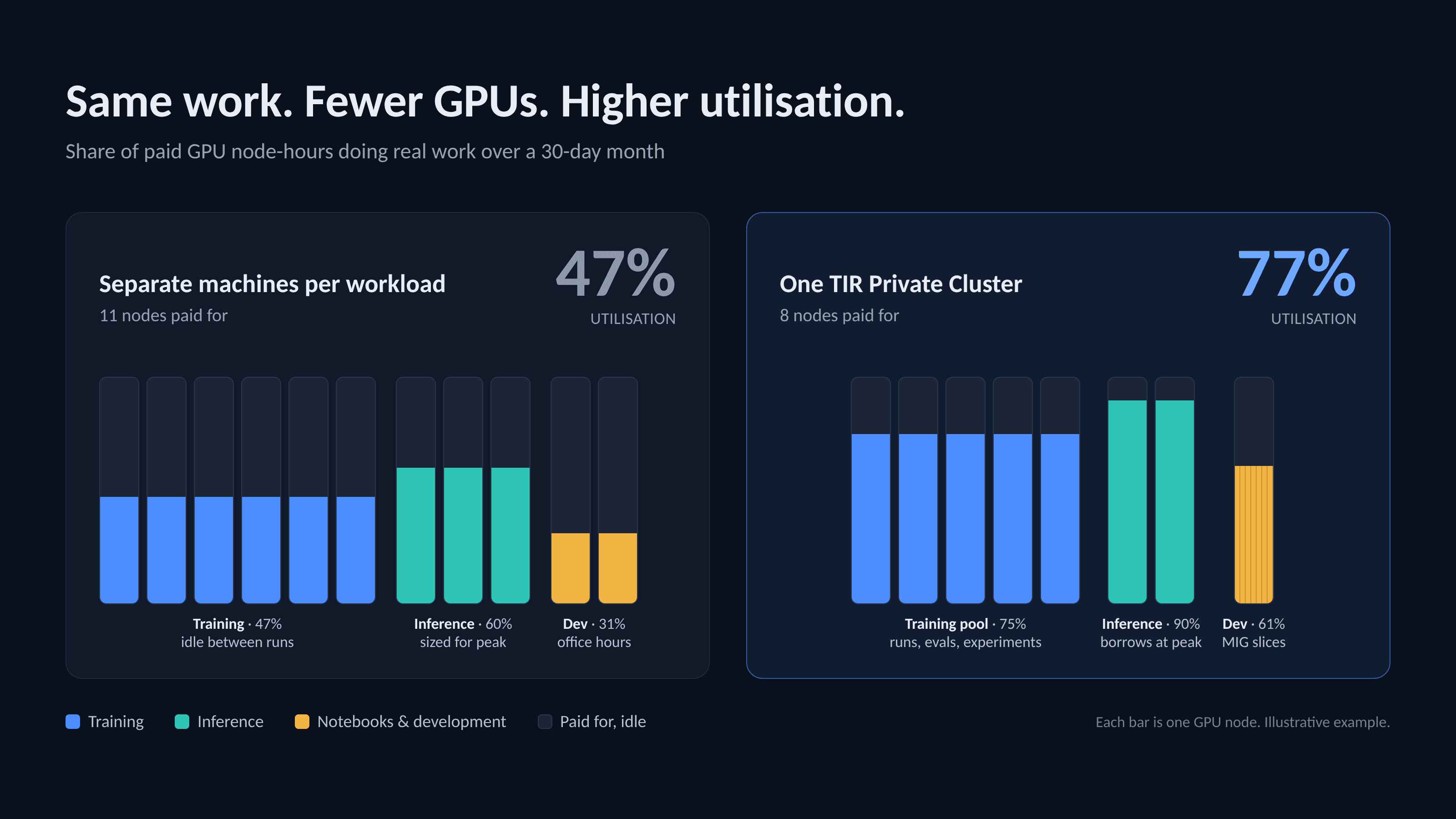
Three workloads on separate machines (left) and on one 8-node Private Cluster (right). Each bar is one GPU node, and the unfilled part is capacity you pay for but don't use. The worked example behind these numbers is further down this post.
The short answer: training needs many GPUs in short bursts, while inference needs fewer GPUs around the clock. Buying capacity separately for each leaves GPUs idle for much of the time you pay for them. A Private Cluster on TIR gives you one dedicated pool of GPU nodes at a fixed price, which you can move between training, inference and development projects as your needs change, so far more of the capacity you pay for is doing useful work.
Training wants GPUs in bursts. Inference wants them all the time.
Ask any AI team where their GPU budget goes and you will usually hear two answers that pull against each other.
Training comes in waves. For a week or two you need every GPU you can get, because a fine-tuning run or a new experiment is waiting. Then the run finishes, the team moves to evaluation, and those GPUs go quiet.
Inference is the opposite. Once a model is live, it has to answer requests at 3 a.m. on a Sunday just as reliably as on a Monday morning. The load is smaller, but it never switches off.
Most teams end up paying for both patterns separately. They rent training capacity when they need it, often at the worst possible price and with no guarantee it will be there. They run inference on a different set of machines that sit half-used for most of the day. The money leaks out of the gaps between the two.
This post is about closing those gaps. We will look at why the usual setup wastes GPU spend, and how Private Cluster on TIR lets one pool of GPUs serve training and inference in turn, so you pay for capacity once and keep it busy.
Where does GPU spend leak?
The cost problem is rarely the price of a GPU hour. It is the hours you pay for and don't use, and the hours you need and can't get.
Training capacity is bought in a hurry. When a run is ready, nobody wants to wait. Teams grab on-demand GPUs at full hourly rates, and when the GPU type they want is in short supply, the run slips. Capacity that isn't reserved isn't guaranteed.
Inference capacity is sized for the peak. A model endpoint has to handle the busiest hour of the day, so it is provisioned for that hour and idles through the rest. A small model that needs a fraction of a GPU often gets a whole one anyway.
The two never share. Training GPUs sit idle between runs while inference runs on separate hardware. Each project or team holds its own machines, so one group can be short of GPUs while another has spare ones it cannot lend.
Put together, you end up with two sets of half-used hardware and a bill that grows faster than the work it supports. What teams want is simpler: a fixed amount of capacity they own for a period, at a better rate, that they can point at whatever needs it this week.
What is a Private Cluster on TIR?
Private Cluster is a dedicated pool of GPU-backed nodes on TIR that belongs to your organisation and is shared across your projects. You pick a GPU type and the number of nodes, choose how you want to pay, and the cluster is ready in under a minute.
From there, the cluster works a lot like a shared team budget, except the currency is GPU nodes:
- Admins hand out nodes to projects. A node starts as Free. When an admin assigns it to a project it becomes Allocated, and once a workload starts on it, Occupied.
- Projects run whatever they need on their nodes. That can be a training cluster for distributed jobs, an inference endpoint for a live model, a vector database, or a node for notebooks and development. Different projects can run different kinds of work on the same cluster at the same time.
- Nodes can be moved. When a workload is stopped, its node goes back to Allocated, and an admin can release it through Project Allocation and give it to another project.
- The bill doesn't change with how you use it. You pay for the cluster, not for the services inside it. Inference endpoints, training clusters, vector databases and nodes running on the cluster carry no extra charge. Only storage you attach (SFS, PFS, datasets) is billed separately.
There are two ways to pay. Hourly is billed per node per hour for as long as the cluster exists. Committed is paid upfront for 30, 90 or 365 days, and the longer the term, the lower the effective rate per node. At the end of a commitment you choose whether it auto-renews, switches to hourly, or shuts down.
On H100 and H200 GPUs, Private Cluster also supports Multi-Instance GPU (MIG). MIG splits one GPU into as many as seven isolated instances, each with its own compute, cache and memory. A single H100 can be cut into slices as small as 10 GB (the 1g.10gb profile), and an H200 into slices as small as 18 GB — plenty for many inference services and notebooks that would otherwise sit on a whole GPU.
Admins and owners manage the cluster and decide where nodes go. Project managers and leads get a view of the nodes in their own scope, so each team can see what it has without being able to take capacity from another.
How do you split one cluster between training and inference?
With Private Cluster, the question changes from "how many GPUs should we rent for training, and how many for inference?" to "how do we keep the GPUs we already have busy?" Here is how teams usually go about it.
- Size the cluster for your normal week, not your busiest day. Add up what inference needs every day, plus the training you run most weeks. That is your cluster. Every node is billed whether it is working or not, and a cluster can grow but not shrink — reducing the node count means deleting the cluster — so starting a little lean is safer than starting large. You can add nodes later from the cluster's Update Configuration option; on a committed cluster, note that nodes added this way are billed at hourly rates, not at your committed rate.
- Commit once the baseline is clear. If you know you will need this capacity for the next quarter or year, a 30, 90 or 365-day commitment brings the per-node rate down. Teams that are unsure can start with a small hourly cluster to learn their usage pattern, then size a commitment from that data.
- Give inference a fixed home. Allocate a set number of nodes to the project that runs your live endpoints and leave them there. Production traffic should never have to compete with a training job for a GPU.
- Slice the GPUs that don't need to be whole. Small models, internal tools and notebooks rarely use a full H100 or H200. MIG lets several of them share one GPU with hardware-level isolation, which frees whole nodes for training.
- Let training borrow everything else. The rest of the cluster is the training pool. When a big fine-tuning run starts, its project gets the free nodes. When the run ends and the workload is stopped, the nodes go back and can be handed to the next experiment, an evaluation job, or extra inference capacity for a launch.
- Watch utilisation, not just the bill. The Cluster Nodes view shows GPU utilisation and memory for each node, along with its status and the services deployed on it. Since the bill is fixed, an idle node is the one thing that costs you. If a node is Allocated but nothing is running on it for days, it belongs somewhere else.
Node Affinity keeps this split in place. On a shared cluster, the risk is that a large training job lands on the nodes your live endpoints depend on, or an experiment ends up next to production. With Node Affinity, admins label nodes into groups such as "inference", "training" or "staging", and each workload is told where it may run: on any node in the cluster, only on a chosen group (affinity), or anywhere except that group (anti-affinity). Training jobs land on the high-memory nodes meant for them, production endpoints stay on their own group, and experiments stay away from both. When the split needs to change, you edit the group rather than reconfigure every workload.
The principle is simple: inference gets steady, protected capacity, training soaks up whatever is left, and nothing sits idle for long.
Example: how much of your GPU capacity is actually working?
The clearest way to see the difference is GPU utilisation: of all the node-hours you pay for in a month, how many run real work. Take a team with three kinds of work and look at a 30-day month (720 hours). This is the example behind the chart at the top of this post.
Setup 1: separate machines for each workload. Each workload gets its own GPUs and holds on to them.
- Training: 6 nodes kept for the training team. Two fine-tuning runs of 7 days each keep them busy for 14 days. The other 16 days they wait for the next run. Utilisation: 47%.
- Inference: 3 nodes sized for the busiest hour. Average traffic needs about 1.8 nodes. Utilisation: 60%.
- Notebooks and development: 2 nodes, used about 10 hours a day on working days. Utilisation: 31%.
Setup 2: one 8-node Private Cluster. The same work runs on a shared pool.
- Inference: 2 nodes stay with the live endpoints. At peak hours, a third node is allocated from the pool.
- Notebooks and small models: 1 node, split into MIG slices, so several developers and small endpoints share it.
- Training: the remaining 5 nodes. The same two fine-tuning runs take about 17 days instead of 14. For the rest of the month, those nodes run evaluations and a second team's experiments that would otherwise have waited for hardware.
| Setup | Nodes paid for | Node-hours paid (30 days) | Node-hours of real work | GPU utilisation |
|---|---|---|---|---|
| Separate machines per workload | 11 | 7,920 | 3,752 | 47% |
| Private Cluster, same work | 8 | 5,760 | 3,752 | 65% |
| Private Cluster, spare time used for experiments | 8 | 5,760 | 4,424 | 77% |
Read the table in two steps. Moving the same workloads onto one shared pool takes utilisation from 47% to 65% — the team pays for 8 nodes instead of 11 and gets the same work done. The third row is what the freed capacity then buys you: a second team's experiments that previously waited for hardware, which lifts utilisation to 77% without changing the bill at all.
You could rent training GPUs on demand instead of holding them, which avoids the idle days. But you pay higher hourly rates for every run, and there is no guarantee the GPUs will be available when your run is ready.
The numbers in this example are illustrative, and they assume the three workloads need the same total node-hours of compute on either setup. Your split will depend on your models, traffic and training schedule.
Is Private Cluster right for your team?
Private Cluster makes the most sense when your GPU use is steady enough to plan around. That usually means you have at least one model in production, more than one team or project competing for GPUs, and training work that comes back every few weeks rather than once a year.
It is less of a fit if you run one experiment and then nothing for months. Because every node is billed for as long as the cluster exists, a cluster that sits idle costs the same as one that is busy. In that case, on-demand GPUs are the better choice until your usage settles into a pattern.
If you are somewhere in between, start small. Create an hourly cluster with a few nodes, move your inference endpoints onto it, and let training use the rest. A few weeks of utilisation data will tell you how big the cluster should be and whether a commitment will pay off.
Getting started is quick. In the TIR dashboard, open Private Cluster, choose a GPU type and node count, pick hourly or committed billing, and create the cluster. Then use Project Allocation to give nodes to your projects, and your teams can launch endpoints, training clusters and notebooks on them as they normally would.
You can read the full Private Cluster documentation or talk to our team about sizing a cluster for your workloads.