The short answer: set Active Workers to 0 on an E2E Networks TIR Model Endpoint and it scales to zero when idle. Keep the model weights on a Shared File System so a new worker reads them from a mounted path instead of downloading them on every start. Turn on async invocation so requests wait in a queue while the worker comes up, instead of timing out. You pay for GPU time only while a worker is running, including the idle timeout you set.
Teams building with LLMs often keep a few inference endpoints running that nobody outside the team ever calls. One serves the model a developer is testing prompts against. Another runs a fine-tuned checkpoint that QA wants to try before it goes anywhere near production. Each of them holds a GPU all day and all night, and each is billed for every hour it holds it.
This post walks through the setup on TIR that fixes this for dev and test work: an endpoint that scales down to zero workers when no one is using it, starts a worker again when a request comes in, and stops billing for GPU time while it sits at zero.
Why do dev inference endpoints cost more than they should?
Production endpoints are busy. Traffic comes in through the day and the GPU is doing work most of the time. Dev and test endpoints follow a different pattern. Someone deploys a model in the morning, sends a few dozen requests while checking outputs, then moves on to a code review or a meeting. The endpoint stays up through lunch, the evening and the weekend, waiting for the next request.
The arithmetic is easy to do for your own team. A week has 168 hours. If people work with an endpoint for about six hours on each working day, it does useful work for roughly 30 of those hours. You pay for the other 138 anyway.
On an L40S at ₹102/hour — a sensible plan for a 7B or 13B dev endpoint — those 138 idle hours cost about ₹14,076 a week per endpoint, against ₹3,060 of work actually done. Scale to zero does not hand all of that back — you still pay for the tail after each burst, and for the occasional cold start — but it moves the bill from 168 hours towards the hours your team was actually working. Add up every model, version and branch your team keeps running, and idle GPU time grows fast. The GPU rate card has the hourly rate for whichever plan your endpoint is on.
Teams usually try one of two fixes, and neither holds up for long:
- Stop endpoints by hand. This works until someone forgets, which tends to happen on the first busy Friday. The next person to test then has to restart the endpoint and wait before they can do anything.
- Share one endpoint across the team. This saves GPUs, but people end up waiting on each other, and it doesn't help when different people need different models or versions.
What dev work needs is an endpoint that is there when someone calls it and gone when no one does, without anyone having to remember to switch it off.
What is scale to zero on TIR Model Endpoints?
Scale to zero means an endpoint drops to zero running workers when there are no requests, and starts a worker again when a new request arrives. The endpoint, its URL and its configuration stay in place. Only the GPU worker goes away.
This is not the same as stopping the endpoint. A stopped endpoint costs nothing either, but it stays stopped until somebody restarts it by hand — which is the habit this setup exists to remove. An endpoint at zero workers brings itself back on the next request, with the same URL it had before.
On TIR, you set this up in the endpoint's serverless configuration. Four settings matter:
| Setting | What it does | What to set for a dev endpoint |
|---|---|---|
| Active Workers | The minimum number of workers that keep running | 0, so the endpoint can scale to zero |
| Max Workers | The most workers the endpoint will scale up to under load | 1 to start — raise it if several people test at the same time |
| Idle Timeout | How many seconds an idle worker stays up waiting for new requests | 300 seconds, so a burst of back-to-back testing reuses the same worker |
| Initial Cooldown Period | How long the endpoint waits after a trigger before it scales down to zero | 300 seconds, so the endpoint doesn't drop to zero and start again straight away |
When Active Workers and Max Workers are different, autoscaling is on. The endpoint can scale on concurrent requests, requests per second, or a runtime metric from vLLM, SGLang, Triton or PyTorch.
It is worth knowing which of those does the work at zero. Runtime metrics such as vllm:num_requests_waiting are read from the serving process, and at zero workers there is no process to read them from — so they cannot be what wakes the endpoint. The step from zero to one is driven by the arriving request itself. Runtime metrics govern what happens after that, when one busy worker needs to become two. On a dev endpoint capped at a single worker they have nothing to do, so leave the metric on the default concurrent-request count and spend your attention on the idle timeout instead.
Those four values are the whole configuration for a dev endpoint:
Active Workers:          0
Max Workers:             1
Metric Type:             Concurrent Request Count
Target Value:            10
Idle Timeout:            300   # seconds — billed, the worker is still up
Initial Cooldown Period: 300   # seconds
Treat 300 seconds as a starting point rather than a rule. If your team sends requests every few minutes through the day, a longer idle timeout keeps one worker warm across those gaps and costs less than paying the cold start each time. If the endpoint is only touched twice a day, shorten it. Either way, check the GPU hours a real endpoint bills after a burst before you budget around a number.
Are you billed when the endpoint is at zero workers?
No GPU charge applies while the endpoint has zero workers. You are billed for GPU time while a worker is running, and that includes the idle timeout, because the worker is still up and holding the GPU during that window. Storage you attach is billed separately as storage.
How does a Shared File System cut cold start time?
Scale to zero has one cost of its own. The first request after a quiet spell has to wait while a worker starts. That wait is the cold start, and most of it goes into getting the model ready.
A new worker needs the model weights before it can serve anything. If the weights live in an object storage bucket or on Hugging Face, the worker downloads them every time it starts, then loads them onto the GPU. On a dev endpoint that scales to zero several times a day, that download repeats every time.
A Shared File System (SFS) takes the download out of the way. SFS is network-attached storage that several machines can mount at the same time. You copy the model weights to the SFS once and attach it to the endpoint at a mount path. When a worker starts, it reads the weights straight from that path instead of downloading a fresh copy. The worker still loads the model onto the GPU, but the download no longer repeats on every start.
Keeping weights on SFS helps dev work in two more ways:
- Every worker reads the same copy. Once you raise Max Workers above 1 and the endpoint adds a second worker under load, it starts from the same files as the first — no second download, no drift between them.
- Swapping checkpoints is quicker. Write a new checkpoint to the SFS from a TIR node that has it attached, and the endpoint can serve it on the next start. You skip the round trip of uploading it somewhere else first.
How does an async queue stop requests from failing during a cold start?
Even with weights on SFS, a worker starting from zero takes some time. If your client sends a normal synchronous request to an endpoint at zero, it holds the connection open while the worker starts. If that takes longer than the client's timeout, the request fails with a timeout or a 503 error, and someone has to retry it.
Async invocation changes that. With async turned on, the endpoint accepts the request, puts it in a queue, and replies straight away with two values:
request_id, which you use to check the status of the requestresponse_location, which tells you where the result will be written
A serverless worker picks up queued requests and processes them. Each result is written as a JSON file to a dataset in E2E Object Storage (EOS), at api/<id>/request/<request_id>.json relative to the dataset root. Your code can poll the async status API with the request ID, or read the file once it is there. The client never has to hold a connection open while the endpoint wakes up.
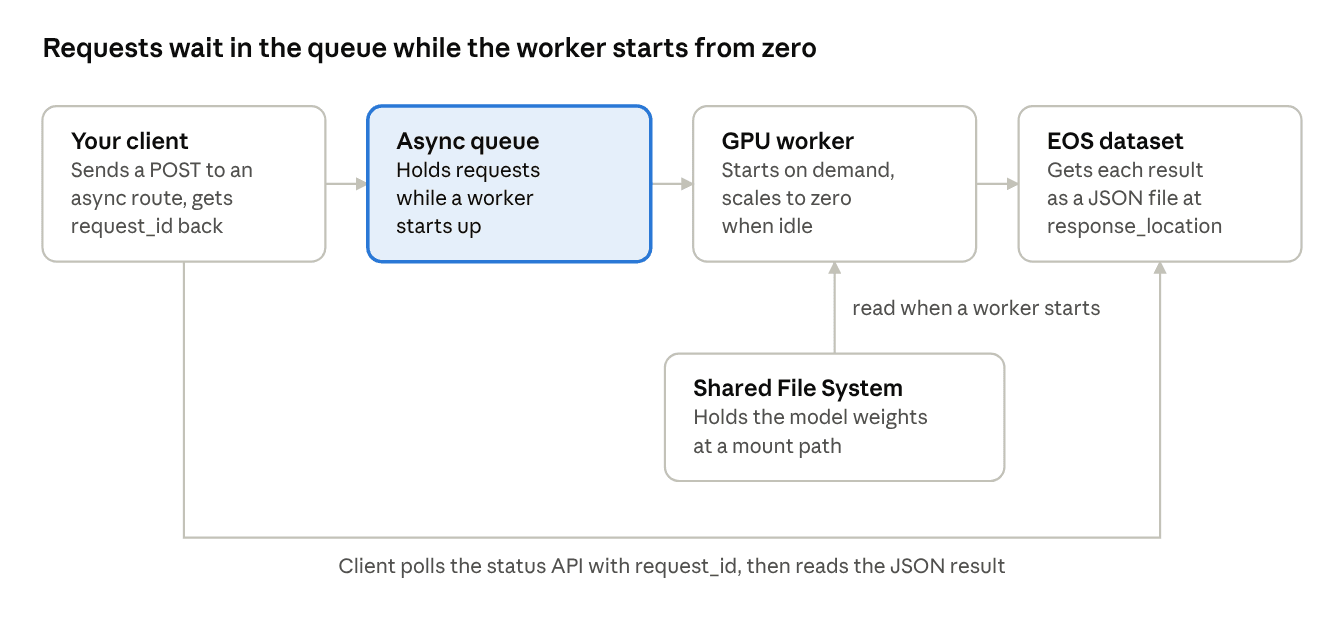
Figure 1. Request flow to a TIR endpoint at zero workers. The client gets a request_id as soon as it sends the request, so it never waits on the cold start.
This suits most dev and test work. Batch evaluations, regression runs against a new checkpoint and nightly test suites don't need an answer within a second. They need every request to land and every result to be saved, and the queue gives you both without anyone holding a connection open.
How do you set this up on TIR?
The whole setup takes six steps. You can do it from the TIR dashboard or through the API.
- Put the model weights on a Shared File System. In your TIR project, go to File Systems › Shared File-System (SFS), click CREATE FILE-SYSTEM and size it for your model. Copy the weights onto it from a node that has the SFS attached, or download them there from Hugging Face.
- Create the model endpoint. Pick a framework — vLLM, SGLang, Triton, PyTorch, NVIDIA Dynamo or your own container — and a GPU plan that fits the model. Attach the SFS, set a custom mount path for it, and point the framework's model path at that location.
- Set up serverless scaling. Set Active Workers to
0and Max Workers to1, with an Idle Timeout and Initial Cooldown Period of about 300 seconds each, so the endpoint doesn't bounce between zero and one worker. - Turn on async invocation. Link a dataset in EOS as the target for results, then list the routes your client will call asynchronously. The dataset has to exist and be linked to your project before you can select it, your application needs read access to it, and the async routes must accept only POST and OPTIONS requests.
- Update your client. Send requests to the async route and store the
request_idfrom each response. Poll the async status API, or read the JSON file atresponse_locationonce the request is complete. - Check the billed hours after a week. GPU hours on the endpoint should now follow the hours your team actually sent requests, plus the idle timeout after each burst.
If the first requests after a quiet spell are slow, check the endpoint's replica status and logs to see whether a worker is still loading the model.
When should you use scale to zero, and when not?
Scale to zero works best when requests come in bursts with long gaps between them, and when a short wait on the first request is fine. That covers most of what a team runs outside production:
- Endpoints that developers test prompts and outputs against during the working day
- Batch evaluations and regression runs against a new checkpoint
- Nightly or scheduled test jobs
- Internal tools and demos that get a handful of calls a day
- Several model versions kept up side by side for comparison
It is the wrong choice in a few cases:
- User-facing traffic where the first request can't wait. If a person is waiting on a reply in a chat window, keep Active Workers at 1 or more so a worker is always ready.
- Committed endpoints. These reserve capacity for a fixed term, can't be stopped during it, and won't scale below the committed replica count. Use hourly endpoints for this setup.
One way to split it: production endpoints keep a warm worker, and every dev, test and staging endpoint is set to scale to zero.
Stop paying for endpoints nobody is calling
Pick the dev endpoint your team touches least, set Active Workers to 0, move its weights onto an SFS, and compare next week's GPU hours against this week's. Copying the weights is the slow part; the endpoint settings themselves are a two-minute change. The bill then tells you whether to do it to the rest.
Know more about TIR Model Endpoints →
Not deployed the model yet? How to deploy a fine-tuned model as an API covers the step before this one, AI Dev Nodes give you a GPU workspace to finish the model first, and TIR covers the rest of the platform. The Model Endpoints documentation and the Shared File System quick start have the full reference.