Andrej Karpathy once described the ideal of "auto-research" — systems that run experiments automatically, freeing humans to think about what to test rather than how to run it. That idea stuck with us.
We run Cloud GPU infrastructure at E2E Cloud. As part of dogfooding, we developed 50+ AI agents for our marketing team. Very quickly, one challenge became obvious—inference optimization. It wasn’t just a customer problem; our own teams were hitting the same wall.
What vLLM settings should be used for a given model on a given GPU to get the best throughput?
The honest answer was always the same: we’re not sure—let’s try a few configs and see. That tribal knowledge, built through trial and error, lived in scattered Slack threads and engineer memory. We decided to automate it.
The result is TokenPeak — an open-source tool that takes a model, a GPU cluster, and a parameter grid, then systematically benchmarks every meaningful configuration to find the one that delivers the highest tokens per second.
The Problem with Default vLLM Settings
vLLM ships with sensible defaults. But "sensible" is doing a lot of work there. When you're running a 32B parameter model on 4× V100 GPUs, the difference between a good config and a bad one isn't marginal — it's the difference between a usable production endpoint and one that falls over under real load.
The parameters that matter most are not obvious:
--gpu-memory-utilizationcontrols how much VRAM is reserved for the KV cache--max-model-lendetermines the maximum context window, which directly impacts KV cache size--max-num-seqssets how many requests can be processed simultaneously--dtypeselects float16 vs bfloat16 — not all GPUs support both--enforce-eagerdisables CUDA graph optimizations — required on V100, A30
The problem is these parameters interact in non-linear ways. A higher --max-num-seqs sounds like it should improve throughput, but if it causes the KV cache to compete with model weights for VRAM, it can actually hurt performance. You need to test combinations, not individual knobs.
That's a combinatorial problem. With 4 memory utilization values × 3 sequence counts × 3 context lengths, you already have 36 configurations before touching dtype or eager mode. Doing this manually on a live production GPU is not an option.
How TokenPeak Works
TokenPeak runs a four-phase loop:
- Probe — detect GPU type, count, and VRAM. This determines valid tensor parallel sizes and which dtype combinations are safe (V100 doesn't support bfloat16; A30 requires enforce-eager).
- Generate — build a pruned configuration matrix. We start with the full cartesian product of parameter values, then apply GPU-specific rules to eliminate configs that would OOM or underperform. This reduces ~500 theoretical combinations to ~20-32 meaningful ones.
- Benchmark — for each config, SSH into the GPU VM, stop the production service, launch vLLM with the test config on a dedicated port (8099), fire 32 concurrent requests with a fixed prompt, measure tokens/second, p50/p95 latency, and TTFT, then tear down and restore.
- Rank — sort by mean tok/s, store all results in PostgreSQL, surface the winner with a ready-to-paste vLLM command.
One design decision we're proud of: TokenPeak never runs on the GPU itself. It runs on a cheap CPU VM and SSH-orchestrates the GPU nodes remotely. The benchmarking infrastructure has zero GPU footprint.
The Benchmark: DeepSeek R1 32B on 4× Tesla V100
Our first real benchmark: deepseek-ai/DeepSeek-R1-Distill-Qwen-32B on a 4× Tesla V100-PCIE-32GB node. Total VRAM: 128GB. vLLM version: 0.8.5.post1. All configs use --dtype float16 --enforce-eager --tensor-parallel-size 4.
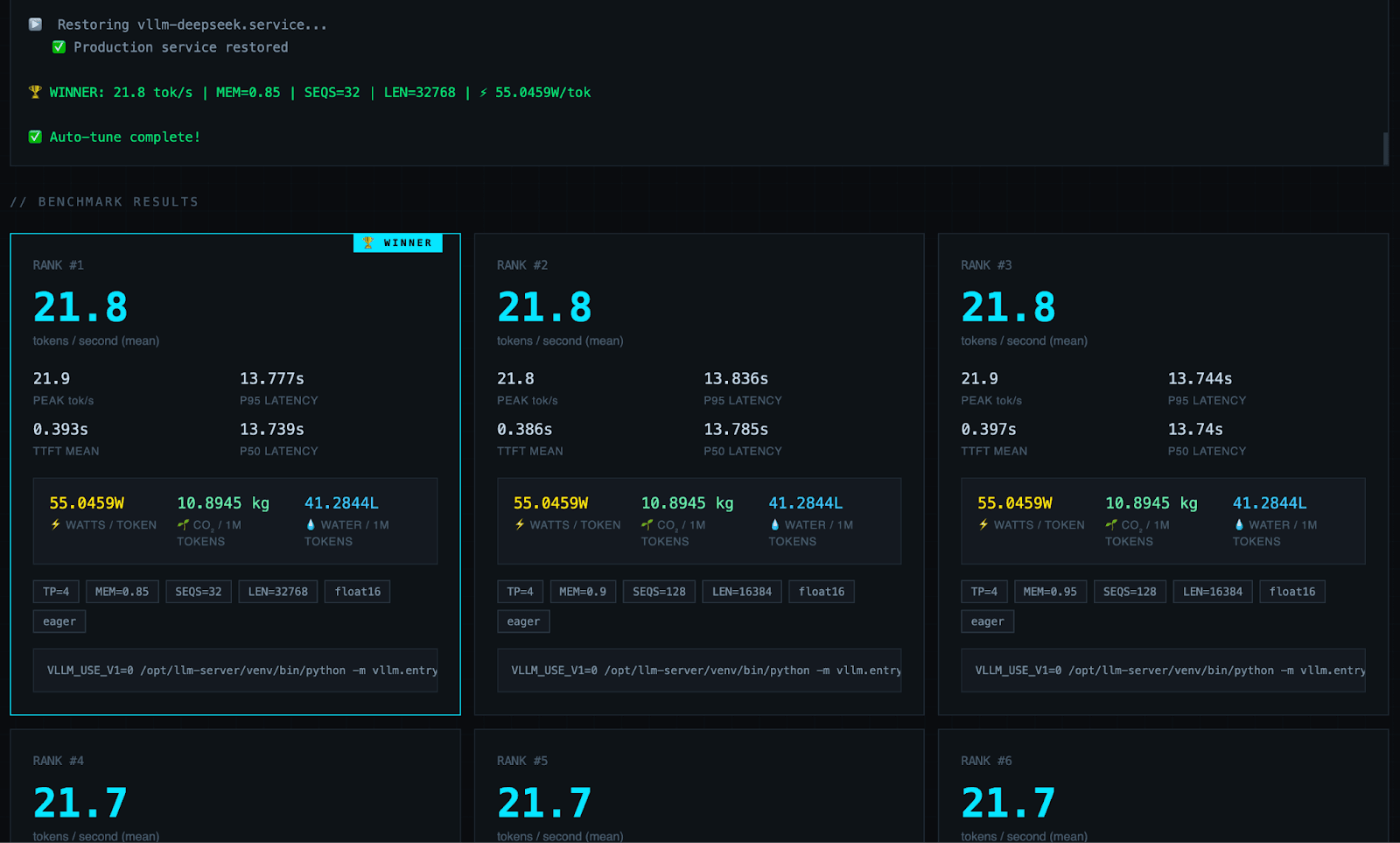
We tested 32 configurations. Here are the results:
Full Results Table
| Rank | tok/s | MEM | SEQS | LEN | W/token | Water/1M tokens |
|---|---|---|---|---|---|---|
| 1 | 21.8 | 0.85 | 32 | 32768 | 55.05W | 41.28L |
| 2 | 21.8 | 0.90 | 128 | 16384 | 55.05W | 41.28L |
| 3 | 21.8 | 0.95 | 128 | 16384 | 55.05W | 41.28L |
| 4 | 21.7 | 0.80 | 32 | 16384 | 55.30W | 41.47L |
| 5 | 21.7 | 0.80 | 64 | 16384 | 55.30W | 41.47L |
| 6 | 21.7 | 0.90 | 32 | 32768 | 55.30W | 41.47L |
| 7 | 21.7 | 0.90 | 64 | 16384 | 55.30W | 41.47L |
| 8 | 21.7 | 0.90 | 128 | 8192 | 55.30W | 41.47L |
| 9 | 21.7 | 0.95 | 64 | 16384 | 55.30W | 41.47L |
| 10 | 21.6 | 0.80 | 32 | 8192 | 55.56W | 41.67L |
| ... | ... | ... | ... | ... | ... | ... |
| 30 | 20.4 | 0.95 | 64 | 8192 | — | — |
| 31 | 20.1 | 0.95 | 32 | 32768 | — | — |
| 32 | 19.8 | 0.85 | 32 | 16384 | — | — |
The Winning Config
VLLM_USE_V1=0 python -m vllm.entrypoints.openai.api_server \
  --model deepseek-ai/DeepSeek-R1-Distill-Qwen-32B \
  --dtype float16 \
  --tensor-parallel-size 4 \
  --gpu-memory-utilization 0.85 \
  --max-model-len 32768 \
  --max-num-seqs 32 \
  --swap-space 4 \
  --enforce-eager \
  --trust-remote-code
21.8 tok/s mean | 21.9 tok/s peak | 0.393s TTFT | 13.78s p95 latency
What the Data Actually Tells Us
Finding 1: The V100 hits a performance ceiling
The spread between rank 1 (21.8 tok/s) and rank 9 (21.7 tok/s) is less than 0.5%. The top 20 configs cluster tightly between 21.3 and 21.8 tok/s. This tells us the V100's compute capacity — not the KV cache configuration — is the binding constraint for this model.
This is actually useful information. It means the V100 is well-utilized with almost any reasonable config. You can't significantly over-tune or under-tune it for DeepSeek R1 32B.
Finding 2: Larger context windows outperform smaller ones
Counterintuitively, --max-model-len 32768 consistently outperforms --max-model-len 8192 at equivalent memory and sequence settings. The best 8192 config scores 21.6 tok/s; the best 32768 config scores 21.8 tok/s.
Our hypothesis: with a larger context window, the KV cache blocks are allocated more efficiently, reducing fragmentation. vLLM's paged attention allocates memory in fixed blocks — larger max_model_len changes the block geometry in a way that slightly reduces overhead.
Finding 3: Lower memory utilization (0.85) beats higher (0.95) at the top
The winner uses --gpu-memory-utilization 0.85, not 0.90 (the production default) or 0.95. At 0.95, the KV cache leaves less room for GPU kernel staging, which can cause subtle slowdowns in the CUDA scheduler. Giving the GPU 15% headroom appears to pay off.
Finding 4: The worst configs are specific, not random
The bottom three configs share a pattern: either MEM=0.95 paired with short contexts (LEN=8192), or the specific combination MEM=0.85 + SEQS=32 + LEN=16384 which scored 19.8 tok/s — nearly 10% below the winner. This combination likely causes suboptimal block allocation where the KV cache is neither large enough to amortize overhead nor small enough to avoid fragmentation.
The Environmental Angle: Power Efficiency
We added an efficiency metric to every benchmark result: instantaneous watts per token, CO₂ per million tokens, and water per million tokens.
The formula is straightforward:
watts per token = total cluster TDP ÷ tok/s
               = 1,200W (4× V100 @ 300W each) ÷ 21.8 tok/s
               = 55.05W per token
This means: while generating each token, the 4× V100 cluster draws 55.05 watts of instantaneous power. To make that number more tangible — generating 1 million tokens consumes roughly 0.015 kWh and produces 10.89 kg of CO₂, with 41.28 litres of water used for data centre cooling.
For the V100 running DeepSeek R1 32B:
| Config | W/token | CO₂/1M tokens | Water/1M tokens |
|---|---|---|---|
| Winner (MEM=0.85, SEQS=32, LEN=32768) | 55.05W | 10.89 kg | 41.28L |
| Worst (MEM=0.85, SEQS=32, LEN=16384) | ~57.6W | ~11.39 kg | ~43.14L |
| Delta | 4.6% less power | 4.6% less CO₂ | 4.6% less water |
A 4.6% reduction in energy per token might sound modest. But at production scale — 10 million tokens per day across a cluster — that's 460,000 fewer tokens worth of wasted energy, every single day, just from choosing the right vLLM configuration.
Better throughput is always greener throughput. The best config for performance is also the best config for the planet.
What TokenPeak Doesn't Do (Yet)
TokenPeak currently tests a fixed grid of parameters. The next version will use Bayesian optimization — treating each benchmark result as a data point to inform smarter sampling of the parameter space. Instead of 32 random configurations, it will converge on the optimum in 8-10 trials.
We also haven't benchmarked A100, A40, or A30 results yet — those runs are in progress. The V100 results show tight clustering, but we expect more dramatic spread on A100 where the performance ceiling is much higher and config sensitivity should be greater.
Coming Soon — Open Source Release
TokenPeak will be released as open source shortly. It runs on any VM with SSH access to your GPU nodes — no cloud lock-in, no SaaS, no API keys. Your models stay on your infrastructure.
When it ships, the core workflow will be:
- Deploy TokenPeak on any CPU VM
- Point it at your GPU node with a model path and GPU type
- Watch it run the benchmark matrix live in the dashboard
- Copy the winning vLLM command and deploy
We'll announce the release on this blog and on LinkedIn. Follow E2E Networks to be notified.
Acknowledgements
TokenPeak was inspired by Andrej Karpathy's framing of auto-research — the idea that the most valuable thing you can automate is the tedious experimental loop, freeing human judgment for the parts that actually require it. We run a Cloud infrastructure. The experimental loop we needed to automate was: what settings actually work best on this hardware? TokenPeak is our answer.
TokenPeak is coming soon as open source. GPU profiles for H100, A10, L4, and more will be included at launch.
E2E Networks is India's public cloud GPU provider. We do a lot of dogfooding ourselves—building and running AI agents internally to automate real enterprise workflows. If you're looking to drive productivity and efficiency through similar automation, we’re happy to share our learnings and walk you through what we’ve built.
Contact: marketing@e2enetworks.com