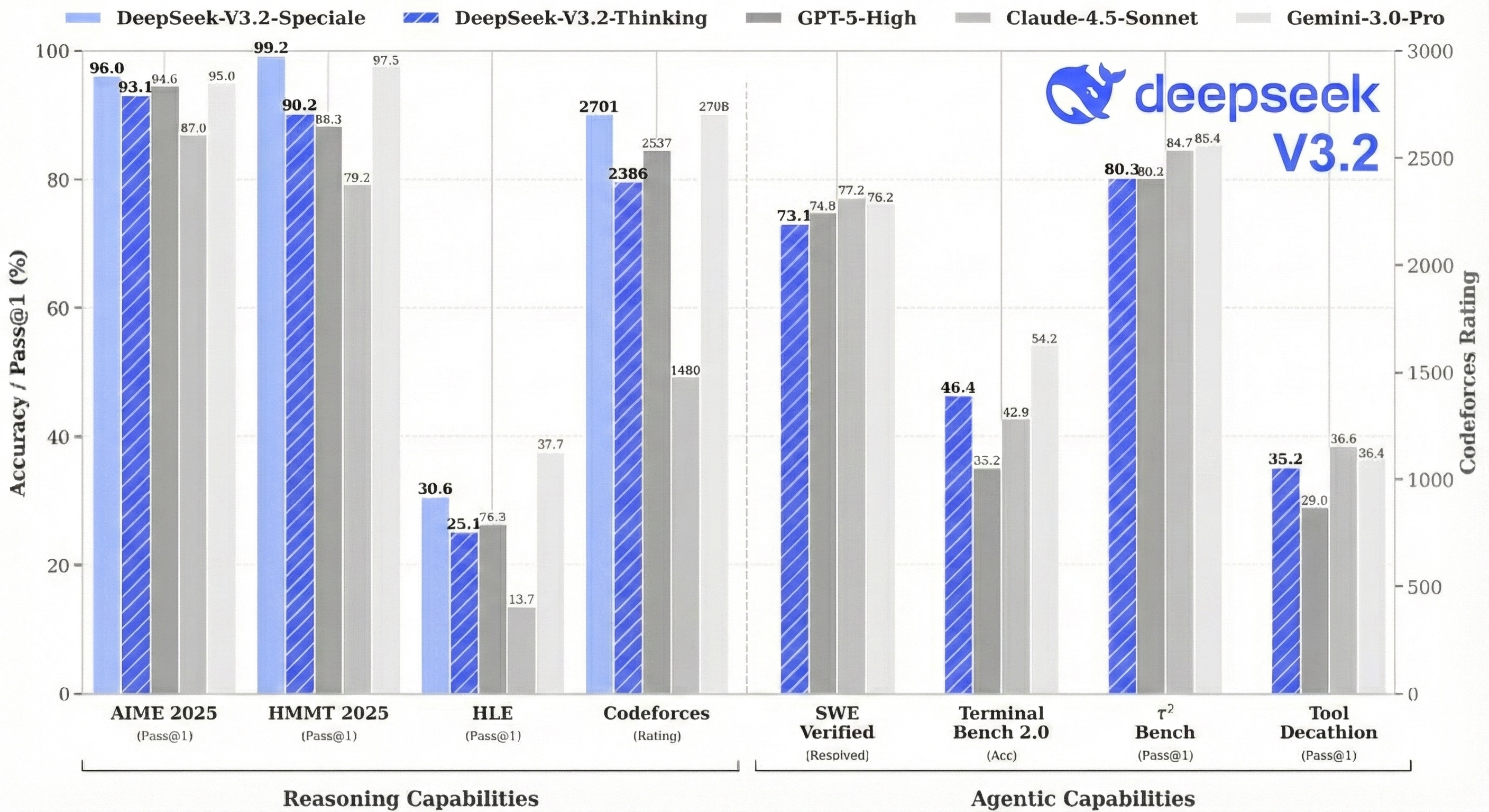
DeepSeek just released V3.2, and the results are worth paying attention to. Their high-compute variant, DeepSeek-V3.2-Speciale, scored 35/42 on the 2025 International Mathematical Olympiad, which is gold-medal level. It also hit gold at IOI 2025, the ICPC World Finals, and China's Mathematical Olympiad. On reasoning benchmarks, it performs similarly to GPT-5 and Gemini-3.0-Pro.
All of this from an open-source model under MIT license.
We went through the paper to figure out what changed. The big additions are a sparse attention mechanism called DSA that cuts long-context inference costs significantly, a post-training setup where they spent over 10% of pre-training compute on reinforcement learning (most teams spend far less), and a pipeline that synthetically generates thousands of agentic tasks to train on. The paper also has some useful details on how they kept RL training stable at this scale.
We'll walk through each of these and look at what the benchmarks actually say.
What Problems Does DeepSeek V3.2 Solve?
The paper identifies three gaps holding back open-source models.
- First, attention gets expensive fast. Standard attention scales quadratically with sequence length, so doubling your context from 64K to 128K tokens means 4x the compute. This makes long-context inference slow and costly, and it limits how much post-training you can do on long sequences.
- Second, open models don't get enough post-training compute. The paper argues that insufficient investment in the post-training phase limits performance on hard tasks.
- Third, open models lag behind on agentic tasks. Specifically, they struggle with generalization and instruction-following in agent scenarios, which hurts real-world deployment.
DeepSeek V3.2 addresses each of these: sparse attention (DSA) for efficiency, scaled RL for post-training, and synthetic task generation for agents.
DeepSeek Sparse Attention: The Core Innovation
The Problem with Regular Attention
When a transformer processes text, each token looks at all the tokens that came before it. This is called attention. The problem is that this scales quadratically with sequence length.
Say you're processing the 10,000th token in a document. With standard attention, the model computes attention scores against all 9,999 previous tokens. Now imagine you're at token 100,000. That's 99,999 attention computations for a single token. Double the context length, and you quadruple the compute.
This is the O(L²) problem, and it's why long-context inference is expensive.
The Core Idea: Not All Tokens Matter Equally
Here's the insight behind DSA: when you're generating a token, you don't actually need to attend to every single previous token. Most of the useful information is concentrated in a small subset. So instead of doing expensive full attention on everything, what if you first figured out which tokens are worth attending to?
That's exactly what DSA does. It uses a lightweight "indexer" to score all previous tokens and pick the top 2,048 most relevant ones. Then it runs full attention only on those 2,048 tokens instead of all 100,000.
This changes the complexity from O(L²) to O(L·k), where k is 2,048. When L is 128,000, that's a massive difference.
 DSA mechanism overview: (A) The lightweight indexer scores tokens and selects top-k for full attention. (B) Two-stage training teaches the indexer what's important, then adapts both components with detached gradients. (Source: Generated by Nano Banana Pro)
How the Lightning Indexer Actually Works
Let's walk through this concretely. Say you're processing token t at position 10,000.
The Lightning Indexer has 64 heads, and for each head, you have a query vector for the current token and a key vector for every previous token. The indexer works like this:
-
For each previous token (say, the token at position 500), you compute a dot product between your query vectors and its key vector. This gives you 64 scores, one per head.
-
You pass each score through ReLU to zero out negative values.
-
Each head has a learned weight. You multiply each score by its corresponding weight.
-
You sum all 64 weighted scores to get a single "importance score" for that token.
-
You repeat this for all 9,999 previous tokens. (In practice, this happens in parallel via matrix multiplication.)
-
You take the top 2,048 tokens by importance score.
-
Only those 2,048 tokens get passed to the main attention mechanism for full computation.
The indexer itself still has O(L²) complexity since it scores all previous tokens. But it's much cheaper than full attention because it uses only 64 heads (the main model uses 128), runs in FP8 precision, and uses a simple ReLU activation. The paper specifically chose ReLU for throughput.
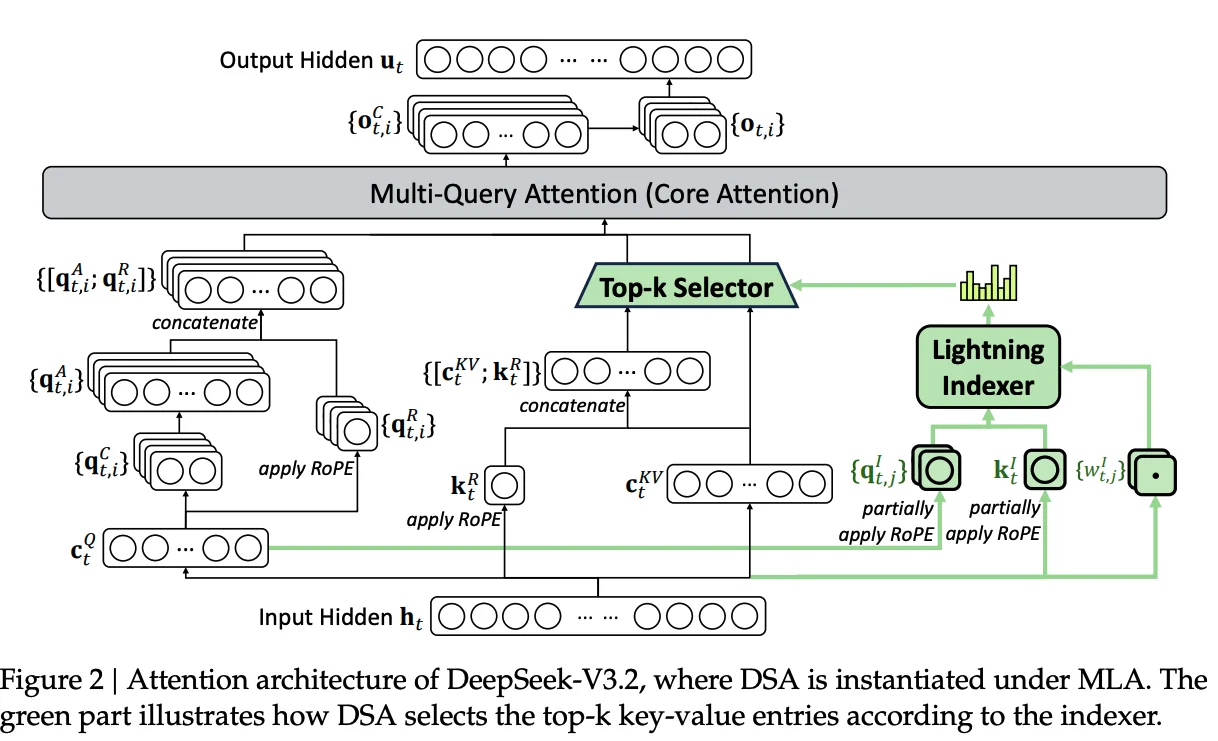 Figure 2: Attention architecture of DeepSeek-V3.2, where DSA is instantiated under MLA. The green part illustrates how DSA selects the top-k key-value entries according to the indexer.
The Result
Figure 3 in the paper shows how inference costs vary with context length. At short contexts, V3.2 and V3.1-Terminus are similar. But as you go toward 128K tokens, V3.2's costs stay relatively flat while V3.1-Terminus costs climb steeply. The gap is especially large for decoding, where V3.2 is substantially cheaper at long contexts.
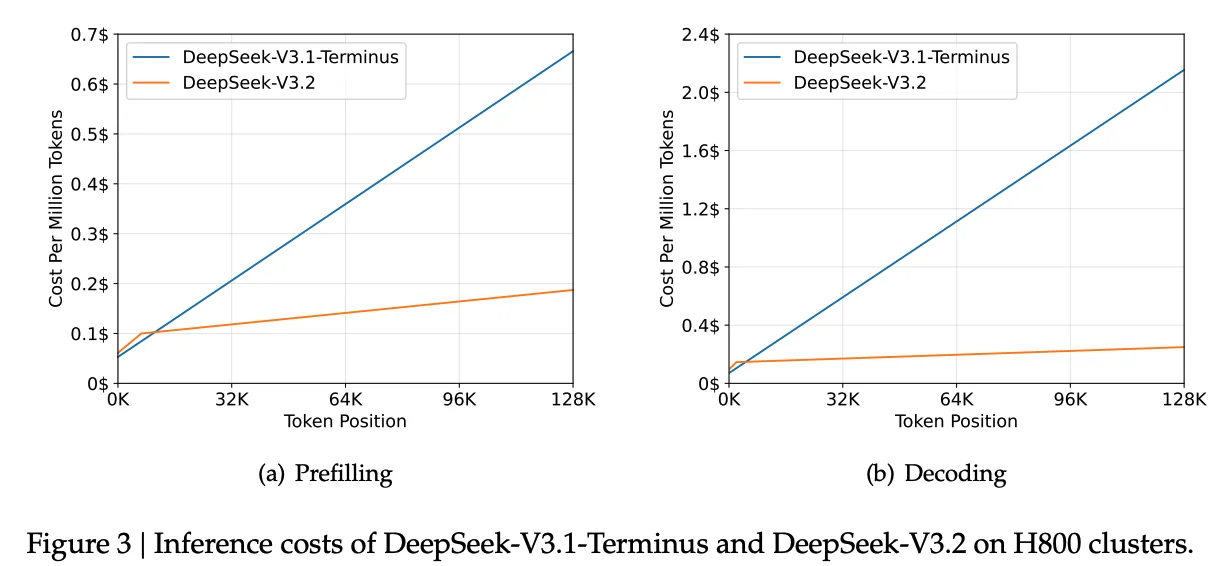 Figure 3: Inference costs of DeepSeek-V3.1-Terminus and DeepSeek-V3.2 on H800 clusters. V3.2's sparse attention keeps costs nearly flat while V3.1's costs climb steeply.
Training DSA Without Breaking the Model
You can't just slap a new attention mechanism onto a trained model and expect it to work. DeepSeek had a 671B parameter model (V3.1-Terminus) that already worked well with dense attention and 128K context. The challenge was teaching it to use sparse attention without forgetting everything it knew.
They solved this with a two-stage training process.
Stage 1: Teach the Indexer What "Important" Means
In Stage 1, the main model stays frozen and keeps running dense attention as usual. Only the indexer is being trained. It watches the dense attention and learns from it.
Here's what happens during each forward pass:
- The main model computes full dense attention over all previous tokens, producing attention weights (e.g., 30% weight on token 500, 5% on token 600, etc.)
- The indexer also computes its own importance scores for all previous tokens
- The training objective: make the indexer's scores match the dense attention weights
To measure "how well do these two distributions match," they use KL divergence. KL divergence is just a way to compare two probability distributions. If the indexer's scores perfectly match dense attention's weights, KL divergence is zero. The more they differ, the higher the value. So training minimizes this gap.
By the end of Stage 1, the indexer has learned what dense attention considers important. It hasn't actually selected anything yet, but it knows how to score tokens in a way that matches the main model's preferences.
This stage was short: 1,000 steps on 2.1 billion tokens. Think of it as orientation before the real job.
Stage 2: Adapt the Whole System to Sparse Attention
Now they turn on sparse attention for real. The indexer selects the top 2,048 tokens, and the main model only attends to those. Both components are unfrozen and training together.
But here's the subtle part: they train with separate objectives.
- Indexer: Still uses KL divergence loss, still trying to match dense attention, but now only on the selected 2,048 tokens
- Main model: Standard language modeling loss (predict the next token)
The paper mentions they "detach the indexer input from the computational graph." This means the two don't share gradients. The indexer doesn't get rewarded for making the main model's job easier, and the main model doesn't influence what the indexer selects. Each learns its own job independently.
Why keep them separate? If they shared gradients, training could become unstable. The main model might learn to game the indexer, or the two could get stuck in feedback loops. Clean separation avoids this.
This stage ran much longer: 15,000 steps on 943.7 billion tokens.
The Result
The two-stage approach is conservative by design. Stage 1 gives the indexer a head start so it's not making random selections when Stage 2 begins. Stage 2 lets the main model gradually adapt to sparse attention while the indexer keeps refining.
The paper shows the final sparse model performs almost identically to the dense version on benchmarks:
| Benchmark | V3.1-Terminus (Dense) | V3.2-Exp (Sparse) |
|---|---|---|
| MMLU-Pro | 85.0 | 85.0 |
| GPQA-Diamond | 80.7 | 79.9 |
| AIME 2025 | 88.4 | 89.3 |
| Codeforces | 2046 | 2121 |
Meanwhile, inference costs drop substantially at long contexts (see Figure 3 above).
Post-Training: Where V3.2 Pulls Ahead
Most open-source models spend relatively little compute on post-training. You do your massive pre-training run, then some supervised fine-tuning, maybe a bit of RLHF, and ship it. Post-training might be 1-2% of your total compute budget.
DeepSeek went bigger. Their post-training budget for V3.2 exceeds 10% of pre-training cost. That's 5-10x more than typical, and it required solving stability problems that don't show up at smaller scales.
Specialist Distillation
The approach is straightforward: instead of training one model to handle everything, first train six specialists:
- Mathematics
- Programming
- General logical reasoning
- General agentic tasks
- Agentic coding
- Agentic search
Each specialist starts from the same V3.2 base checkpoint but gets heavy RL training exclusively on its domain. The math specialist only sees math problems, the coding specialist only writes code, and so on.
Once trained, these specialists become data generators. Each one produces high-quality solutions for its domain. DeepSeek combines all this generated data and trains the final V3.2 model on the mixture.
The result: the final model performs only slightly below each specialist on that specialist's domain. And that gap closes after additional RL training on the combined model.
You end up with one model that's nearly as good as six specialists, without actually deploying six separate models.
How the RL Training Works
DeepSeek uses GRPO (Group Relative Policy Optimization). For each prompt, the model generates multiple candidate responses. Each response gets a score. The model learns to favor responses that score above the group average.
The key efficiency gain of GRPO over PPO is that it eliminates the critic network (value function). Instead of training a separate model to estimate baselines, GRPO just uses the average reward within each group as the baseline. This cuts memory requirements roughly in half.
Different tasks need different reward signals:
- Reasoning and agent tasks: Binary outcome rewards. Did the code pass the tests? Did the agent finish the task? They also add length penalties (don't ramble) and language consistency rewards (stick to one language).
- General tasks: A generative reward model evaluates responses against rubrics specific to each prompt.
Mixed RL Training
One more design choice: reasoning, agents, and human alignment all train together in a single RL stage.
The alternative would be sequential training: first optimize for reasoning, then for agents, then for alignment. But this causes catastrophic forgetting. The model gets good at agents, then forgets some math. Gets aligned, forgets some agent skills.
By mixing all domains in every batch, the model maintains performance across everything simultaneously. Different reward types apply to different examples within the same training run.
Keeping RL Stable at Scale
RL training is a loop: generate responses, score them, update the model, repeat. At modest scale, you can be a bit sloppy with the details. At large scale, small inconsistencies compound into real problems.
The authors ran into several issues and developed fixes for each.
Stale data. For efficiency, you generate a big batch of responses, then do multiple training updates on that batch. But here's the problem: after the first update, the model has changed slightly. After the second update, it's changed a bit more. By the time you're processing the last mini-batch, those responses came from a model that no longer exists.
Most of the time this is fine. But sometimes a response diverges so much from what the current model would produce that learning from it becomes harmful. This is especially true for negative examples - responses the model should learn to avoid. If the model has already moved away from that behavior, forcing it to "avoid" something it wouldn't do anyway can push it in weird directions.
The fix: measure how different each response looks under the current model versus when it was generated. If the gap is too large and the response has a negative reward, skip it.
Inference vs training mismatches. The system that generates responses and the system that trains on them are often different codebases, optimized for different things. This creates subtle mismatches.
One example: V3.2 uses Mixture-of-Experts (MoE), where different expert sub-networks activate for different inputs. The routing decision ("which experts should handle this token?") can differ between inference and training due to implementation details. This means you might generate a response using experts A, B, and C, but then train on it using experts A, B, and D. You're optimizing parameters that weren't even used during generation.
The fix: record which experts were selected during generation and force the same routing during training.
Another example: during generation, they use top-p sampling, which means the model only considers tokens above a certain probability threshold. Low-probability tokens are ignored entirely. But the training loss function assumes all tokens are possible options. This mismatch can cause issues.
The fix: save the sampling mask (which tokens were considered) and apply it during training so both phases work with the same set of candidate tokens.
Biased gradients. RL training typically includes a penalty to prevent the model from drifting too far from a reference policy. The standard way to estimate this penalty has a subtle mathematical bias. When the current model assigns very low probability to a token that the reference model liked, the gradient can blow up in unhelpful ways. Over long training runs, these errors accumulate.
The authors corrected the estimator using importance sampling weights, which removes the bias and keeps gradients stable.
The common theme: make sure training sees exactly what generation saw. Mismatches between the two phases cause instability, and at scale, instability kills your training run.
Thinking in Tool-Use
Reasoning models like DeepSeek-R1 think through problems step-by-step before answering. But there's a question: what happens when the model needs to use tools?
The Context Problem
R1's original approach was to discard the thinking trace whenever a new message arrived. For simple Q&A, this works fine. But in tool-use scenarios, you might call 10 tools to answer a single question. If the model throws away its thinking after each tool call, it has to re-reason the entire problem from scratch every time.
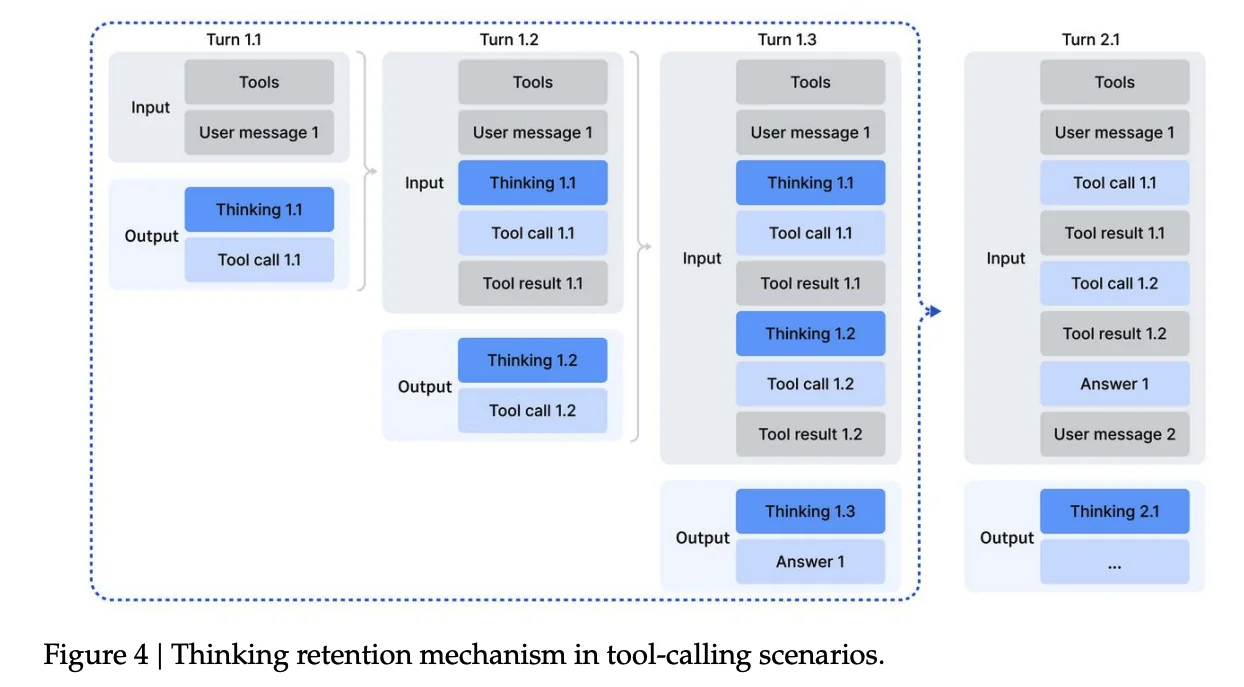 Figure 4: Thinking retention mechanism in tool-calling scenarios. The thinking trace is preserved across tool calls within a single user turn, only being discarded when a new user message arrives.
The authors changed how context is managed:
- If the model calls a tool and gets a result back, the thinking trace is kept. The model remembers its plan while waiting for tool outputs.
- Only when a new user message arrives does the thinking trace get discarded.
- Tool call history (what was called, what it returned) is always preserved, even across user messages.
This way, the model can execute a multi-step plan involving several tool calls without losing its train of thought.
The Cold-Start Problem
Training a model to think and use tools together requires training data where both happen in the same trajectory. The authors had plenty of reasoning data (thinking, no tools) and plenty of agentic data (tools, no deep thinking). But they didn't have examples of models thinking through a problem while also calling tools mid-thought.
Their solution was simple: write a system prompt that explicitly instructs the model to do both. Something like "you can use tools multiple times during your thinking process, call them inside your reasoning."
This generated enough valid examples to bootstrap the RL training loop.
Synthetic Agentic Tasks
To train robust agents, you need diverse tasks. The authors used a mix of real and synthetic environments.
For code agents, search agents, and code interpreters, they used real tools: actual web search APIs, real Jupyter notebooks, actual coding environments. The prompts were either extracted from the internet or synthetically generated, but the tools themselves were real.
For general agent tasks, everything was synthetic. An automated pipeline generates environments, tools, tasks, and verification functions from scratch.
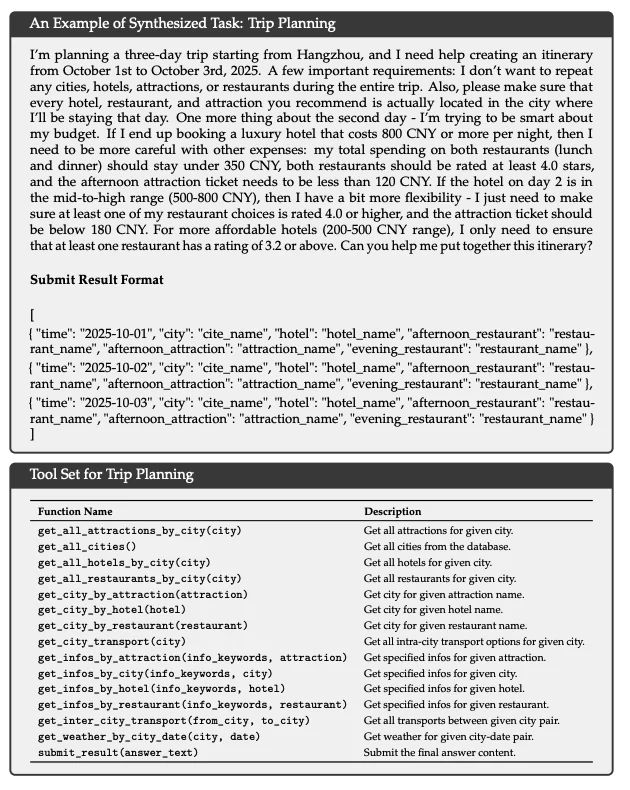 An example of a synthesized trip planning task with complex constraints and the tool set available to solve it.
Take trip planning as an example. The pipeline creates a fake database of hotels, restaurants, and attractions. It generates tools to query prices, ratings, and availability. Then it creates tasks with constraints like "don't repeat any city" or "if the hotel costs over 800 CNY, keep restaurant spending under 350 CNY." Finally, it writes a verification function that checks if the final itinerary satisfies all constraints.
Searching through this kind of combinatorial space is hard. Verifying a candidate solution is easy. That's what makes these tasks good for RL.
In total: 1,827 unique environments and over 85,000 task prompts.
| Task Type | Count | Environment | Prompts |
|---|---|---|---|
| Code Agent | 24,667 | Real | Extracted |
| Search Agent | 50,275 | Real | Synthesized |
| General Agent | 4,417 | Synthesized | Synthesized |
| Code Interpreter | 5,908 | Real | Extracted |
How It Performs
Here's where V3.2 lands on benchmarks.
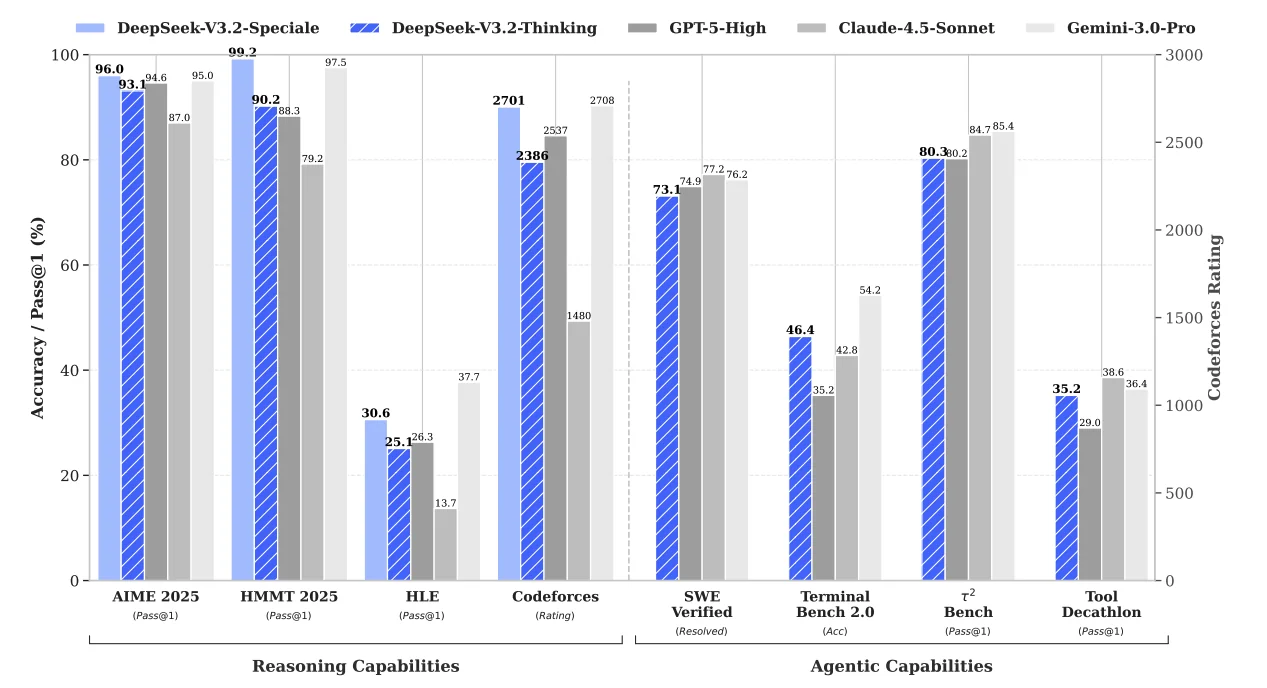 DeepSeek-V3.2 performance compared to GPT-5, Gemini-3.0-Pro, and Claude-4.5-Sonnet across reasoning and agentic benchmarks.
Reasoning
| Benchmark | DeepSeek-V3.2 | GPT-5-High | Gemini-3.0-Pro | V3.2-Speciale |
|---|---|---|---|---|
| AIME 2025 | 93.1% | 94.6% | 95.0% | 96.0% |
| HMMT Feb 2025 | 92.5% | 88.3% | 97.5% | 99.2% |
| Codeforces (Rating) | 2386 | 2537 | 2708 | 2701 |
| HLE | 25.1% | 26.3% | 37.7% | 30.6% |
The base V3.2 model is competitive with GPT-5 on most reasoning benchmarks. Gemini-3.0-Pro leads on some tasks like HLE. But V3.2-Speciale, the variant trained with relaxed length constraints, matches or beats Gemini on competition math. It hits 96.0% on AIME 2025 (vs Gemini's 95.0%) and 99.2% on HMMT (vs Gemini's 97.5%).
Agentic Tasks
| Benchmark | DeepSeek-V3.2 | GPT-5-High | Gemini-3.0-Pro |
|---|---|---|---|
| SWE Verified | 73.1% | 74.9% | 76.2% |
| Terminal Bench 2.0 | 46.4% | 35.2% | 54.2% |
| τ²-bench | 80.3% | 80.2% | 85.4% |
On code agents (SWE Verified, Terminal Bench), V3.2 is close to or exceeds GPT-5. The gap with closed-source models is narrower here than on pure reasoning.
Competition Results (V3.2-Speciale)
The high-compute variant hit gold-medal performance across major competitions:
| Competition | Score | Medal |
|---|---|---|
| IMO 2025 | 35/42 | Gold |
| IOI 2025 | 492/600 | Gold |
| ICPC World Finals 2025 | 10/12 problems | Gold |
| CMO 2025 | 102/126 | Gold |
These results come from a single model without competition-specific training.
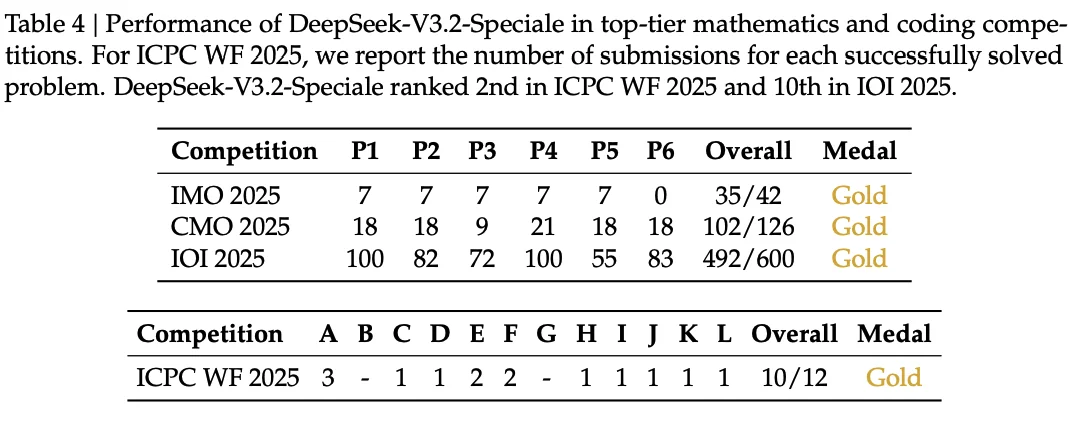 Table 4: Performance of DeepSeek-V3.2-Speciale in top-tier mathematics and coding competitions. DeepSeek-V3.2-Speciale ranked 2nd in ICPC WF 2025 and 10th in IOI 2025.
The Trade-off: Token Efficiency
One caveat: V3.2 often uses more tokens than Gemini-3.0-Pro to reach similar performance. On AIME 2025, V3.2-Speciale averages 23k output tokens versus Gemini's 15k. On Codeforces, the gap is larger: 77k versus 22k.
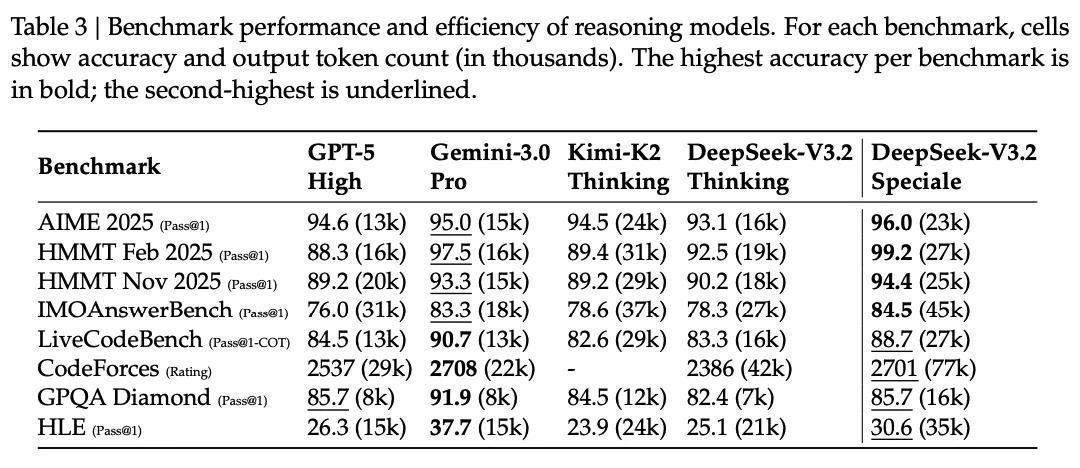 Table 3: Benchmark scores with output token counts (in thousands). V3.2-Speciale leads on accuracy but uses more tokens than Gemini-3.0-Pro on most tasks.
More thinking helps, but it costs more. The authors note that token efficiency remains an area for future work.
Running DeepSeek V3.2 on E2E Networks
DeepSeek officially recommends running V3.2 on 8x H200 GPUs. The vLLM deployment guide covers the technical setup, including tool calling and reasoning parser configuration.
Getting the Hardware
On E2E Networks, you can spin up an 8x H200 node through TIR (Tensor Inference Runtime). Head to the TIR console, create a new instance, and select the 8x H200 compute plan. Pick the vLLM pre-built image so you don't have to install dependencies manually. Attach your SSH key, configure a security group with port 22 open, and allocate enough storage for the model weights.
On pricing: E2E offers spot instances for H200 nodes at ₹704/hour compared to ₹3,032.40/hour for dedicated capacity. That's roughly 77% cheaper. Spot instances work well for experimentation and batch inference where occasional interruptions are acceptable.
Storage Requirements
DeepSeek V3.2 is a 671B parameter MoE model. The weights take up significant disk space. Make sure you have at least 700GB of free storage in /home/jovyan before attempting to download the model. Anything stored outside this path may get wiped on container restarts.
The NVLINK Error
If you see NCCL-related errors when starting the server, particularly around NVLS (NVLink SHARP), disable it with this environment variable:
export NCCL_NVLS_ENABLE=0This is a known issue on some H200 configurations and doesn't affect inference quality.
DeepGEMM Kernel Compilation
DeepSeek V3.2 uses DeepGEMM, a custom FP8 matrix multiplication library that compiles kernels at runtime using JIT. The first time you start the server, you'll see progress bars like this:
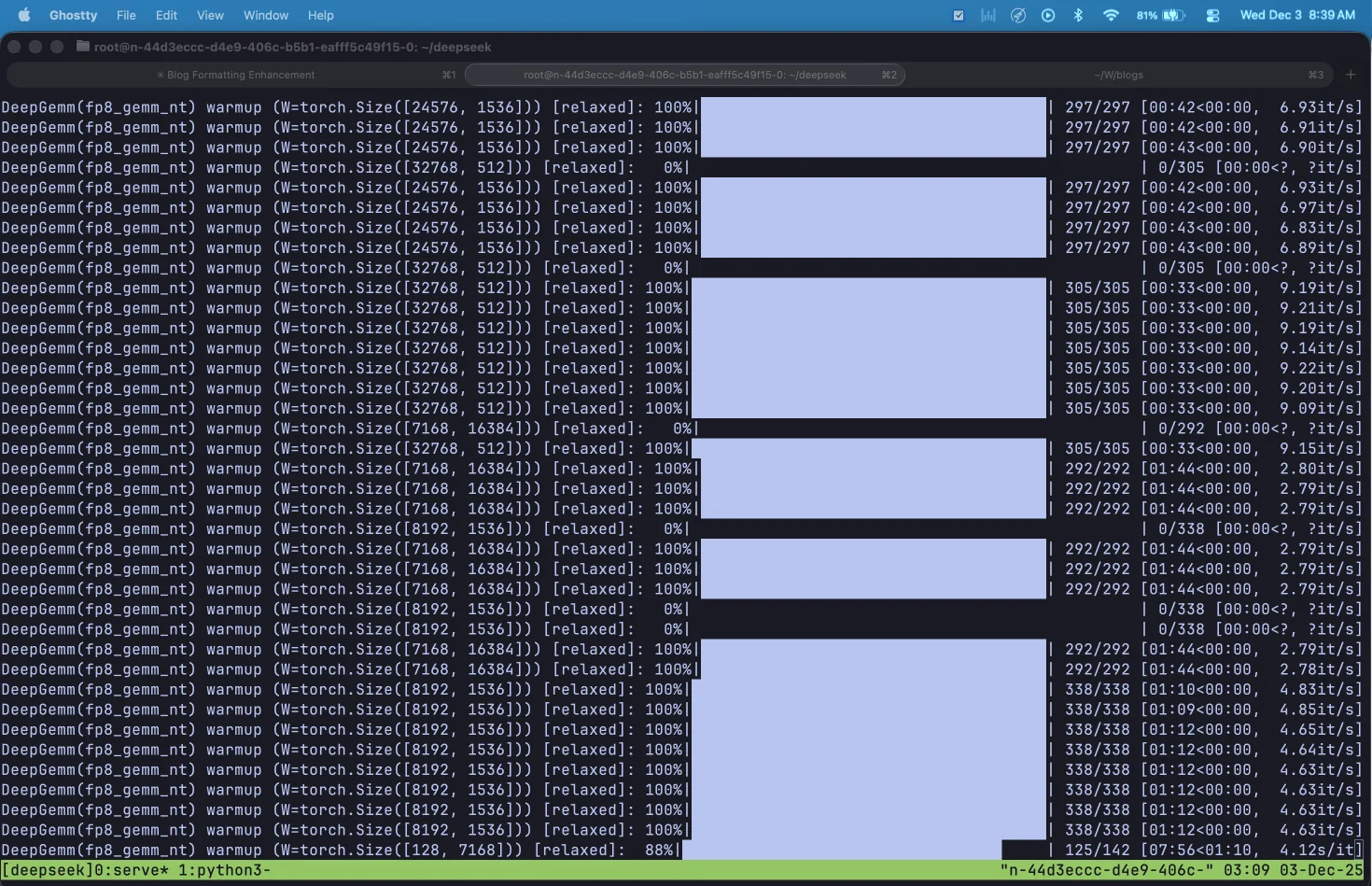 DeepGEMM warming up FP8 kernels. Each GPU compiles optimized kernels for different matrix shapes and batch sizes.
This warmup process takes 25-40 minutes on first startup. Each GPU compiles hundreds of kernels for different (M, N, K) combinations across the model's 256 experts. Once compiled, these kernels are cached and subsequent startups take only a few seconds.
The vLLM Command
Here's the command to serve the model:
export HF_HOME=/home/jovyan/
export DG_JIT_CACHE_DIR=/home/jovyan/.deep_gemm
export NCCL_NVLS_ENABLE=0

vllm serve deepseek-ai/DeepSeek-V3.2 \
    -dp 8 \
    --enable-expert-parallel \
    --served-model-name deepseek-v32 \
    --max-num-seqs 256 \
    --host 0.0.0.0 \
    --port 8000 \
    --gpu-memory-utilization 0.95 \
    --tokenizer-mode deepseek_v32
Understanding Data Parallel + Expert Parallel: The combination of -dp 8 and --enable-expert-parallel creates a hybrid parallelism strategy optimized for MoE models. With data parallelism, the attention layers are replicated across all 8 GPUs, and each GPU processes independent batches of requests. This avoids duplicating the KV cache, which matters for DeepSeek's Multi-head Latent Attention (MLA) architecture. With expert parallelism enabled, the 256 MoE experts are distributed across the 8 GPUs (32 experts per GPU) rather than being sharded. When a token needs to activate its top-k experts (DeepSeek V3.2 uses k=8), it gets routed via all-to-all communication to whichever GPUs hold those experts. The alternative, tensor parallelism (-tp 8), would shard each expert's weights across all GPUs, which hurts kernel efficiency and requires expensive all-reduce operations after every layer. Expert parallelism keeps each expert intact on a single GPU, and DeepGEMM's FP8 kernels are specifically tuned for this configuration.
What each flag does:
-dp 8: Data parallel across 8 GPUs. Attention weights are replicated, each GPU handles independent requests.--enable-expert-parallel: Distributes the 256 MoE experts across GPUs (32 per GPU) instead of sharding them.--served-model-name deepseek-v32: The name clients will use to reference the model in API calls.--max-num-seqs 256: Maximum concurrent sequences. The default of 1024 can cause OOM errors on 141GB H200s, so we lower it.--gpu-memory-utilization 0.95: Use 95% of available GPU memory for KV cache.--tokenizer-mode deepseek_v32: Uses the DeepSeek V3.2 chat template for proper formatting.
Enabling Tool Calling and Reasoning
vLLM recently added proper support for DeepSeek V3.2's tool calling and reasoning capabilities. To enable these features, add three additional flags to your server command:
vllm serve deepseek-ai/DeepSeek-V3.2 \
    -dp 8 \
    --enable-expert-parallel \
    --served-model-name deepseek-v32 \
    --max-num-seqs 256 \
    --host 0.0.0.0 \
    --port 8000 \
    --gpu-memory-utilization 0.95 \
    --tokenizer-mode deepseek_v32 \
    --tool-call-parser deepseek_v32 \
    --enable-auto-tool-choice \
    --reasoning-parser deepseek_v3
What each new flag does:
--tool-call-parser deepseek_v32: DeepSeek V3.2 uses a unique special token format for tool calls that differs from other models. When the model wants to call a function, it outputs something like:
<|tool▁calls▁begin|><|tool▁call▁begin|>get_weather<|tool▁sep|>{"location":"Tokyo"}<|tool▁call▁end|><|tool▁calls▁end|>
The parser knows how to extract the tool name and JSON arguments from this format and convert it into OpenAI-compatible API responses. Without the correct parser, tool calls either fail entirely or appear as raw text in the response instead of structured tool_calls objects.
--enable-auto-tool-choice: This flag enables the model to autonomously decide when to call tools. Without it, you're limited to manually specifying which function to call for each request. With it enabled, you can pass tool_choice="auto" in your API requests and let the model decide based on context. This is essential for agentic workflows where the model needs to reason about which tools to use and when.
--reasoning-parser deepseek_v3: This parser extracts the model's thinking process from its final answer. When you enable thinking mode, DeepSeek V3.2 wraps its reasoning in <think>...</think> tags. The parser separates this into two fields: reasoning_content (the step-by-step thinking) and content (the final answer). Without this parser, you'd see the raw tags in your output.
Using tool calling in practice:
from openai import OpenAI

client = OpenAI(
    base_url="http://localhost:8000/v1",
    api_key="dummy"
)

tools = [
    {
        "type": "function",
        "function": {
            "name": "get_weather",
            "description": "Get current weather for a location",
            "parameters": {
                "type": "object",
                "properties": {
                    "location": {"type": "string", "description": "City name"},
                    "unit": {"type": "string", "enum": ["celsius", "fahrenheit"]}
                },
                "required": ["location"]
            }
        }
    }
]

response = client.chat.completions.create(
    model="deepseek-v32",
    messages=[{"role": "user", "content": "What's the weather in Tokyo?"}],
    tools=tools,
    tool_choice="auto"
)

# Model autonomously decides to call get_weather
if response.choices[0].message.tool_calls:
    for tool_call in response.choices[0].message.tool_calls:
        print(f"Function: {tool_call.function.name}")
        print(f"Arguments: {tool_call.function.arguments}")
Tool calling with thinking mode: DeepSeek V3.2's thinking mode supports tool calling. The model can perform multiple rounds of reasoning and tool calls before outputting the final answer. To use both together:
response = client.chat.completions.create(
    model="deepseek-v32",
    messages=[{"role": "user", "content": "What's the weather in Tokyo tomorrow?"}],
    tools=tools,
    tool_choice="auto",
    extra_body={"chat_template_kwargs": {"thinking": True}}
)

# Access reasoning and tool calls
if response.choices[0].message.reasoning:
    print("Reasoning:", response.choices[0].message.reasoning)
if response.choices[0].message.tool_calls:
    for tool_call in response.choices[0].message.tool_calls:
        print(f"Tool: {tool_call.function.name}")
vLLM vs DeepSeek API differences: When using tool calling with thinking mode, note these differences from the official DeepSeek API:
- Thinking mode activation: vLLM uses
extra_body={"chat_template_kwargs": {"thinking": True}}, while DeepSeek's API usesextra_body={"thinking": {"type": "enabled"}} - Reasoning field: vLLM uses
reasoning, DeepSeek's API usesreasoning_content - Empty tool calls: vLLM returns an empty list
[], DeepSeek's API returnsNone
Verifying the Server
Once vLLM finishes loading, check if the server is responding:
curl http://localhost:8000/healthYou should get:
{"status":"healthy"}To list available models:
curl http://localhost:8000/v1/modelsUsing the OpenAI SDK
vLLM exposes an OpenAI-compatible API. Here's how to call it with the Python SDK:
from openai import OpenAI

client = OpenAI(
    base_url="http://localhost:8000/v1",
    api_key="dummy"  # vLLM doesn't require auth by default
)

response = client.chat.completions.create(
    model="deepseek-v32",
    messages=[
        {"role": "system", "content": "You are a helpful assistant."},
        {"role": "user", "content": "Explain what makes MoE models efficient."}
    ],
    temperature=1.0,
    top_p=0.95,
    max_tokens=2048,
    stream=True
)

for chunk in response:
    if chunk.choices[0].delta.content:
        print(chunk.choices[0].delta.content, end="", flush=True)
DeepSeek recommends temperature=1.0 and top_p=0.95 for best results, as noted on their model card.
To enable thinking mode (where the model shows its reasoning), add the chat_template_kwargs parameter:
response = client.chat.completions.create(
    model="deepseek-v32",
    messages=[...],
    extra_body={"chat_template_kwargs": {"thinking": True}},
    stream=True
)
Adding a Chat Interface with Open WebUI
If you want a proper chat interface instead of raw API calls, Open WebUI is a self-hosted frontend that connects to any OpenAI-compatible backend. It gives you conversation history, model switching, and a clean interface for interacting with your models.
Start Open WebUI pointing to your vLLM server:
OPENAI_API_BASE_URL=http://127.0.0.1:8000/v1 OPENAI_API_KEY=dummy open-webui serveAfter creating an admin account, you'll see the chat interface with your model available:
 Open WebUI with the DeepSeek V3.2 model loaded and ready.
Set the recommended parameters in Chat Controls (temperature=1, top_p=0.95):
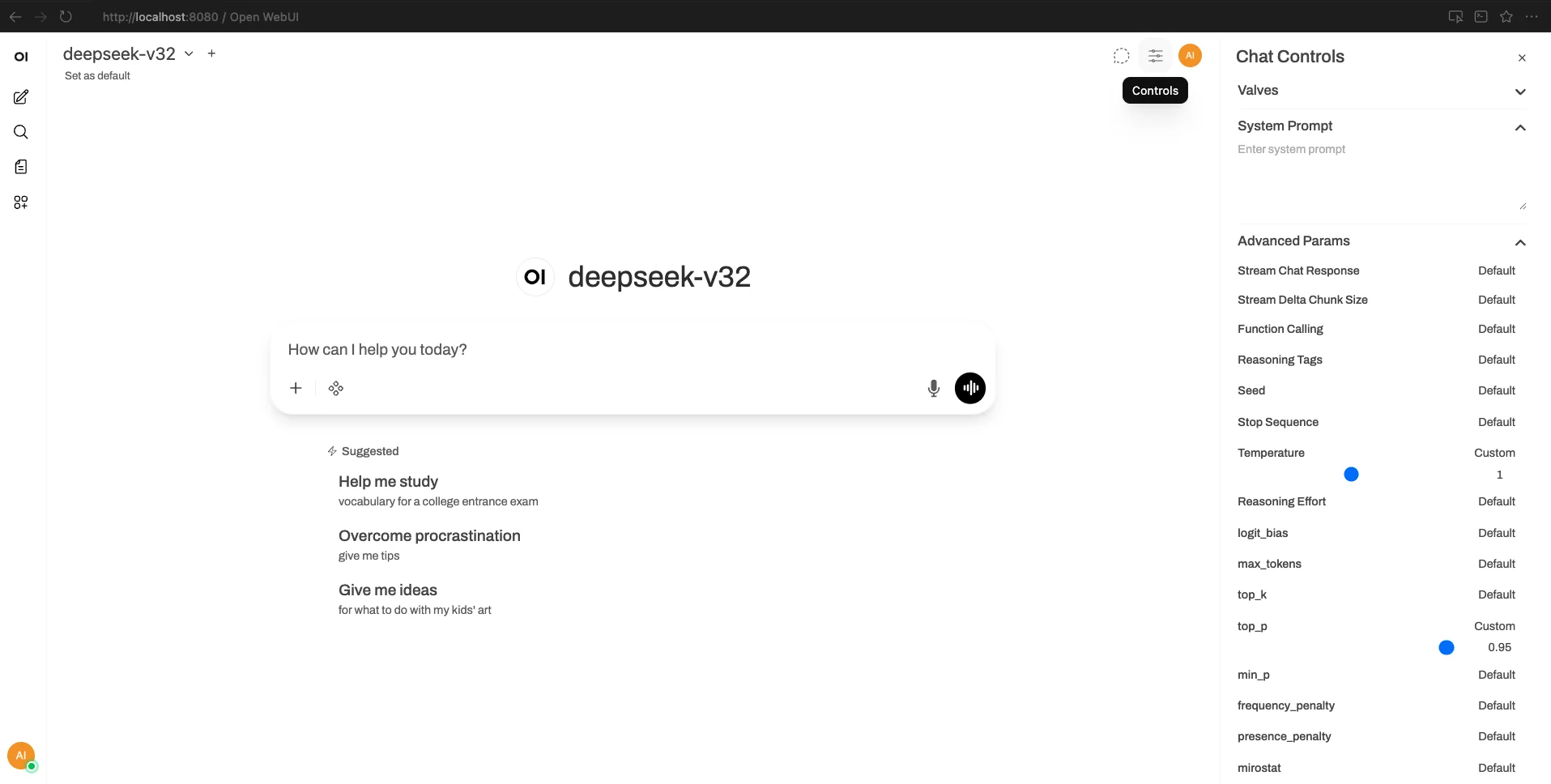 Configure temperature and top_p in the Chat Controls panel.
Enabling thinking mode in Open WebUI: The interface doesn't natively pass the thinking parameter to vLLM. To enable it, create a custom function that intercepts requests and adds the parameter. Go to Admin Panel → Functions → New Function and add:
from pydantic import BaseModel, Field
from typing import Optional
class Filter:
def inlet(self, body: dict, user: Optional[dict] = None) -> dict:
body["chat_template_kwargs"] = {"thinking": True}
return body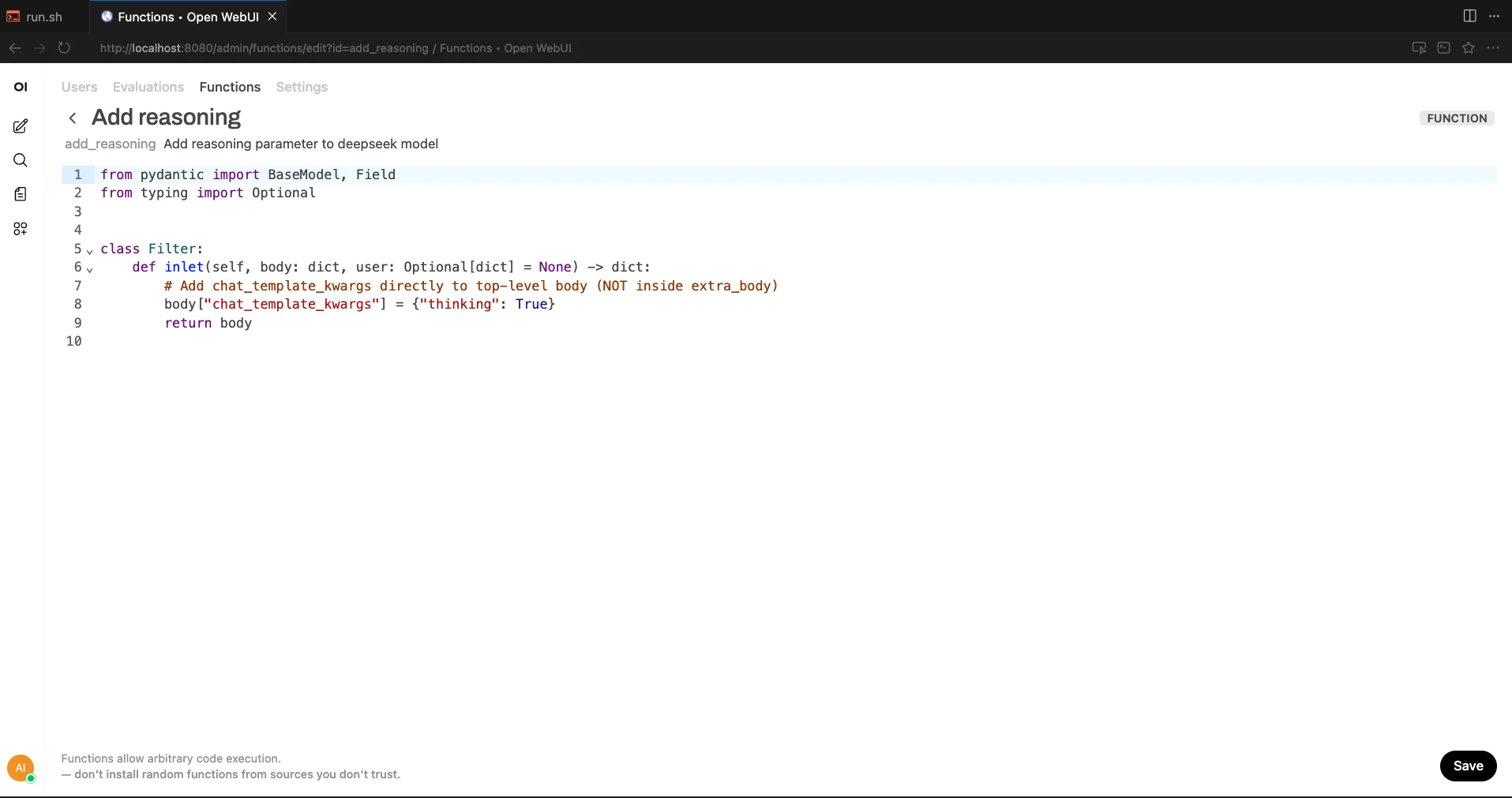 Creating the inlet function to inject the thinking parameter.
Save the function and enable it globally:
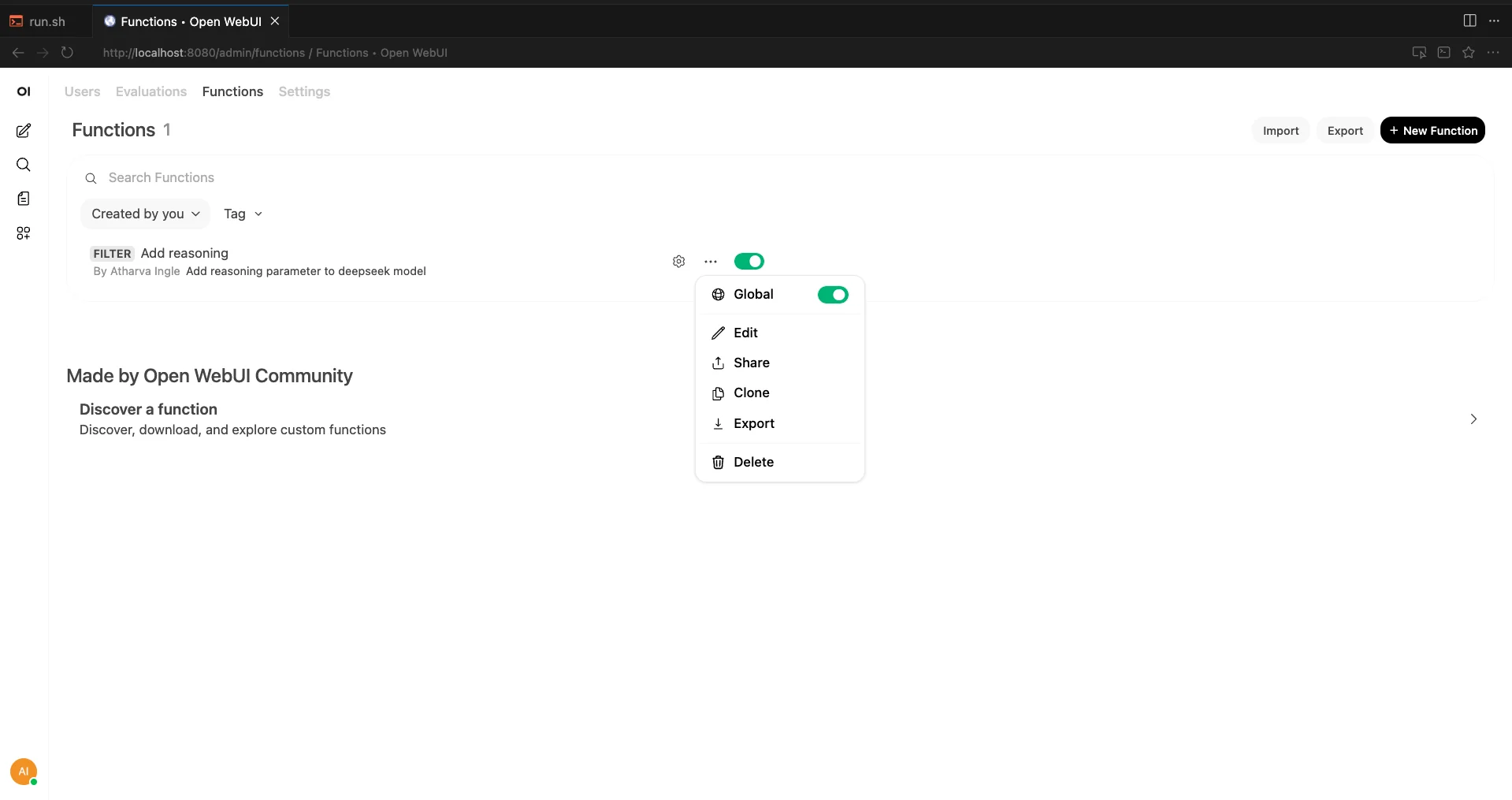 Enable the function globally so it applies to all chats.
Now the model's reasoning will appear in a collapsible "Thinking" section before each response:
<video controls width="100%"> <source src="https://objectstore.e2enetworks.net/e2eblog/2025/blogs/deepseek-v32/deepseek_openwebui_working.mp4" type="video/mp4"> Your browser does not support the video tag. </video> *DeepSeek V3.2 reasoning through a math problem in Open WebUI, with the thinking trace visible in the collapsible section. Playback at 2x speed.*Conclusion
We went through the paper, ran the model on 8x H200s on E2E Networks, and came away genuinely impressed. An open-source model winning gold at the Math Olympiad and going toe-to-toe with GPT-5 on reasoning is not something we expected to see this soon.
The ideas here are worth paying attention to even if you never run the model yourself. Sparse attention that keeps long-context costs flat, RL training at 10% of pre-training compute, synthetic task generation for agents. These aren't just DeepSeek tricks. They're techniques the broader community will likely adopt.
If you want to try it yourself, the setup is documented above. Spin up an 8x H200 node on E2E Networks, run the vLLM command, and you've got a frontier reasoning model responding to your prompts. It's a good time to be working with open models.