Introduction
October 2025 saw a wave of open-source OCR model releases. Six major models dropped in a single month, and if you're processing documents at scale, now's a good time to look at what these open models can do for your workflows.
Proprietary OCR software is expensive at scale. Azure Document Intelligence, AWS Textract, and Google Document AI charge $1.50 per 1,000 pages for basic text extraction, dropping to $0.60 per 1,000 pages at volumes above 1 million pages. A company processing 10 million pages monthly pays around $7,000 for basic OCR.
But that's just text extraction. Add structured data extraction (tables, forms, key-value pairs) and costs jump to $10-50 per 1,000 pages. At 10 million pages monthly, you're looking at $100,000-500,000. The meter runs fast when you need more than raw text.
Open-source OCR models running on your own GPU infrastructure cost a fraction of that. Roughly $0.19 to $0.94 per 1,000 pages, depending on the model you pick. The difference comes from how you pay. Proprietary OCR APIs charge per page. Self-hosted models charge for GPU time. Your cost is the hourly GPU rate, not a per-page fee.
Cost isn't the only reason to run your own OCR infrastructure.
Your documents never leave your network. Healthcare companies can't send patient records to third-party APIs. Banks won't upload financial statements to external services. Law firms need confidential contracts to stay confidential. With open-source OCR, everything runs in your VPC. HIPAA, GDPR, and SOC2 compliance become straightforward.
You can customize the models. Proprietary OCR services are black boxes. You get what you get. Open-source models can be fine-tuned for your specific document types. Medical records with specialized terminology. Financial forms with unique layouts. Historical documents with degraded text. You own the model, you adapt it to your data.
There are no rate limits. Process documents as fast as your GPU allows. Batch jobs that would take days on rate-limited OCR APIs finish in hours. Your throughput scales with your hardware, not with someone else's API quotas. Build your own self-hosted OCR API with complete control over scaling and performance.
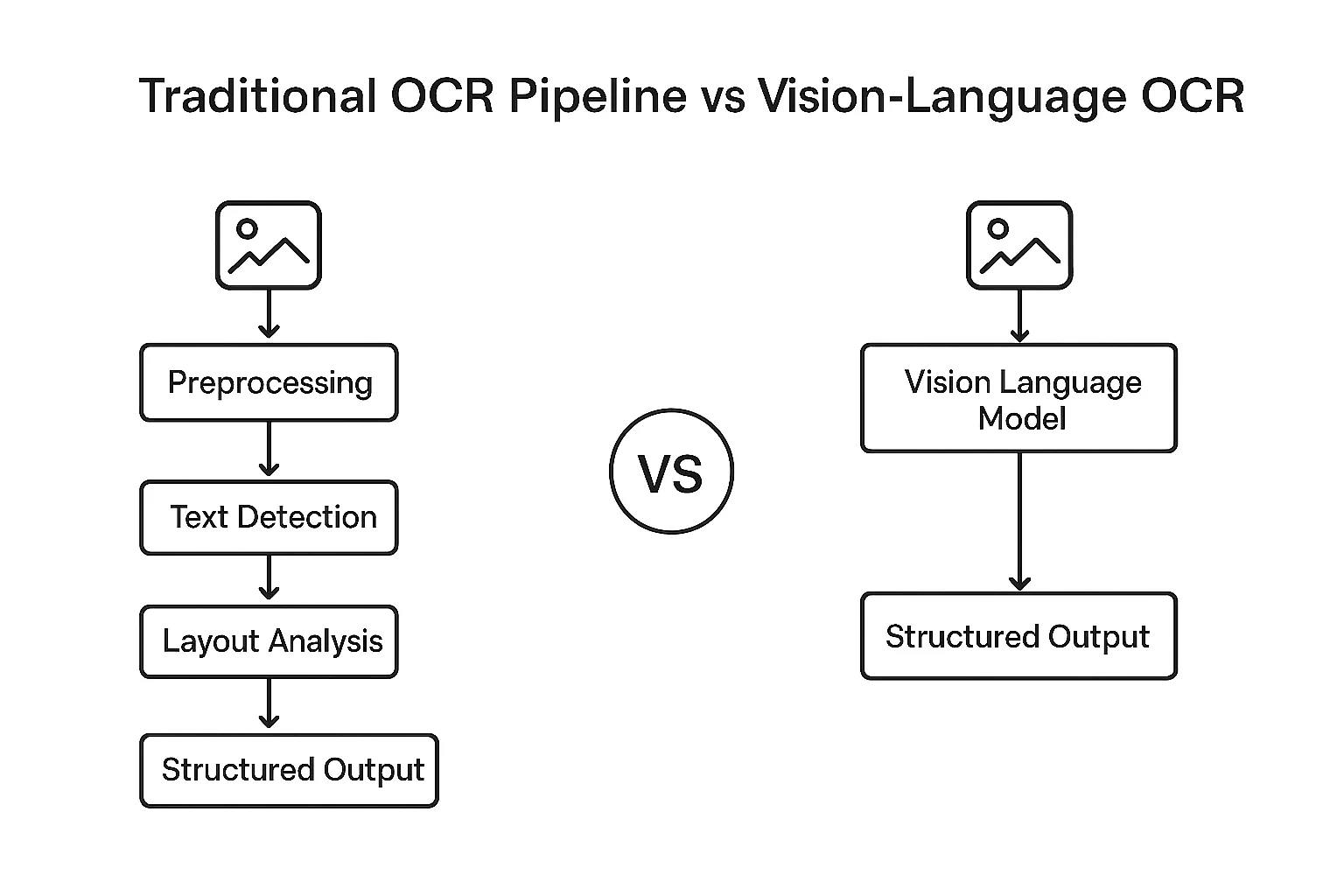
The technical breakthrough here is the shift from pipeline-based OCR to end-to-end vision language models (VLMs). Traditional OCR required separate models for text detection, recognition, and layout analysis. Each component was a potential failure point. VLM-based OCR takes a document image and generates structured markdown or HTML in a single pass. Complex tables, mathematical equations, multi-column layouts all handled by one model.
This happened throughout 2024 and 2025, with particularly explosive growth in October 2025 alone. That single month saw the release of six major open-source OCR models: Nanonets OCR2-3B, PaddleOCR-VL-0.9B, DeepSeek-OCR-3B, Chandra-OCR-8B, OlmOCR-2-7B, and LightOnOCR-1B. Combined with earlier 2025 releases like dots.ocr-3B (July) and Qwen2.5-VL (September), these models reached accuracy levels that match or exceed proprietary services. The olmOCR-Bench leaderboard shows open-source models scoring 75-83% on challenging document parsing tasks.
This guide covers seven state-of-the-art open-source OCR models released in 2024-2025. You'll learn which model fits your use case, how to deploy on GPU infrastructure (A100, H100, H200), and what performance to expect at different scales. We'll show you working code, real benchmarks, and cost calculations for processing millions of pages.
If you're evaluating whether to use proprietary APIs or self-hosted models, this guide gives you the data to decide. If you're already committed to open-source OCR, you'll learn which model to pick and how to deploy it efficiently.
Best OCR Models for 2025: What's New
Model Architectures & Key Differentiators
Traditional OCR systems were built as pipelines with separate models for text detection, recognition, and layout analysis. This introduced failure points at every stage. A document with complex tables might fail at detection, dense mathematical equations could break during recognition, and multi-column layouts often got scrambled during layout analysis.
Vision language models changed this by processing documents end-to-end. Instead of breaking the task into stages, VLM-based OCR takes a document image and generates structured markdown or HTML in a single forward pass. The model sees the entire page at once and understands spatial relationships between elements - it knows a subscript belongs to a formula, it tracks reading order across columns, and it preserves table structure during conversion.
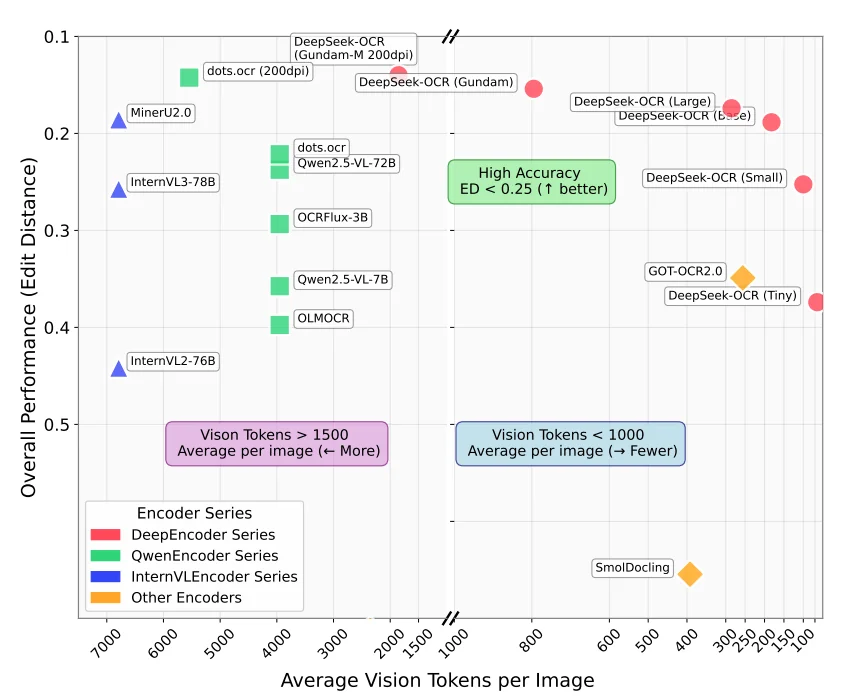
The core challenge in VLM-based OCR is managing the trade-off between accuracy and efficiency. A typical document page contains around 1,000 words, and feeding that at native resolution to a standard vision encoder generates thousands of vision tokens. More tokens means more compute, more memory, and slower inference. But if you compress too aggressively, you lose critical details like superscripts, table borders, or faint text in degraded scans. Each model makes different architectural choices to handle this trade-off, which determines what types of documents it excels at and how fast it runs on your hardware.
You can find how many vision tokens a model generate typically from this graph (taken from the DeepSeek-OCR paper released recently)
We're covering several models released in 2024-2025. For each one, we'll explain the architecture, the key innovation that differentiates it from the others, and the use cases where it performs best. After the individual breakdowns, we'll compare them side-by-side to help you pick the right model for your workload.
dots.ocr (Released July 2025)
dots.ocr came from RED's AI Lab in July 2025, built on fine-tuned Qwen2.5-VL. The model totals 3B parameters: a 1.2B vision encoder plus a Qwen2.5-1.5B language model backbone. It runs fast despite handling complex documents and was trained specifically for OCR tasks across 100+ languages, including low-resource scripts like Tibetan and Kannada.
Architecture: Fine-tuned Qwen2.5-VL with a custom vision encoder (dots.vit) trained through a three-stage pretraining process followed by supervised fine-tuning.
- Stage 1: Trained a 1.2B vision encoder from scratch on image-text pairs
- Stage 2: Aligned the vision encoder with Qwen2.5-1.5B using diverse visual data including OCR, video, and grounding datasets while keeping the language model frozen
- Stage 3: Specialized the model for OCR using pure document data, first with the vision encoder frozen, then with all parameters unfrozen
The vision encoder supports up to approximately 11 million pixel inputs through NaViT architecture.
After pretraining, dots.ocr went through supervised fine-tuning on 300,000 samples using an iterative data flywheel. The team sampled bad cases, manually annotated them, and added them back to training over three iterations. Reading order corrections came from larger models plus rule-based post-processing, with a multi-expert system handling data cleaning.
Key Innovation: Unified architecture that consolidates layout detection and content recognition into a single vision-language model with prompt-based task switching. Unlike traditional OCR pipelines that chain multiple specialized models together, dots.ocr handles all tasks such as layout detection, text extraction, bounding-box grounding, table parsing, and formula recognition by simply changing the input prompt.
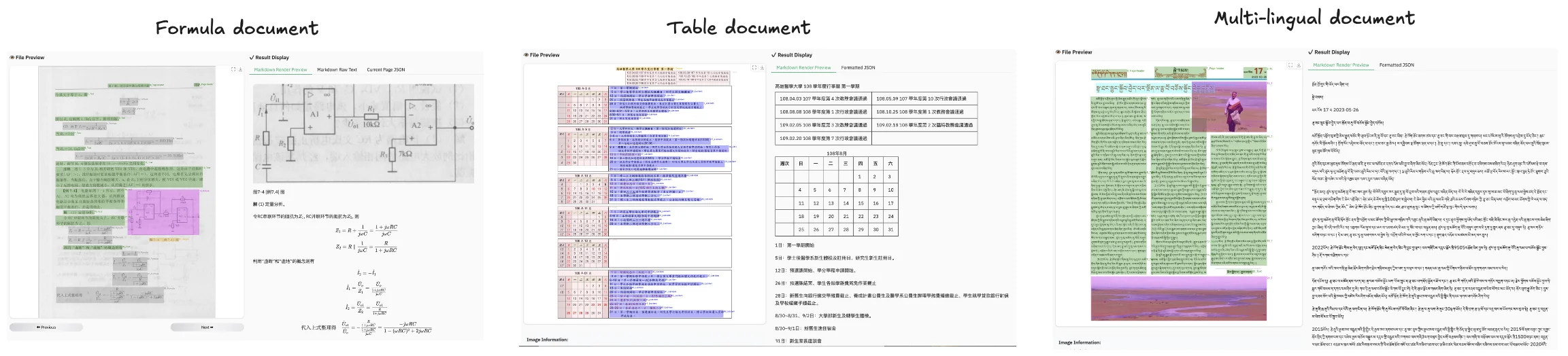
The grounding capability allows dots.ocr to detect and locate document elements (text, tables, formulas) and return their bounding box coordinates, providing spatial understanding of where elements appear on the page.
You can see in the example given below how it can detect formula, tables and multi-lingual text.
Production Considerations: Despite its strong benchmark performance, dots.ocr is not yet optimized for high-throughput processing of large PDF volumes. The model may encounter parsing issues with excessively high character-to-pixel ratios (recommended DPI: 200) and can struggle with continuous special characters like ellipses or underscores, which may cause output repetition. Additionally, dots.ocr is not yet perfect for high-complexity tables and formula extraction. The model performs optimally on images under 11,289,600 pixels total resolution. This is noted in their GitHub blog.
Nanonets OCR 2 (Released October 2025)
Nanonets OCR 2 came from Nanonets in October 2025, built on fine-tuned Qwen2.5-VL. The model totals 4B parameters and was designed specifically for transforming documents into LLM-ready structured markdown with semantic tagging.
Architecture: Fine-tuned Qwen2.5-VL-3B (approximately 4B parameters total) with additional training on over 3 million pages spanning research papers, financial reports, legal contracts, healthcare records, tax forms, receipts, and invoices. The training dataset included documents with embedded images, plots, equations, signatures, watermarks, checkboxes, and complex tables, plus flowcharts, organizational charts, handwritten materials, and multilingual documents.
Training happened in two stages:
- Stage 1: The model was trained on synthetic data to build foundational OCR capabilities across diverse document types and layouts.
- Stage 2: Fine-tuning on manually annotated datasets to improve accuracy on specialized document elements like tables, equations, checkboxes, and signature fields.
The architecture uses custom semantic tags (<signature>, <watermark>, <page_number>, <img>, <checkbox>) to mark different content types during output generation.
Key Innovation: Semantic tagging system that explicitly identifies and labels document elements beyond raw text extraction. Nanonets OCR 2 wraps different content types in semantic tags: signatures go in <signature> tags, watermarks in <watermark> tags, page numbers in <page_number> tags, and checkbox states get converted to standardized Unicode symbols (☐ for unchecked, ☑ for checked). Images get described and wrapped in <img> tags with either their caption or an AI-generated description. Flowcharts and organizational charts get converted to executable Mermaid code.
This approach works well for forms with checkboxes and signature fields, legal contracts where signature detection matters, and workflows where downstream LLMs need structured metadata about content types rather than undifferentiated text. The model also includes targeted Visual Question Answering training that returns "Not mentioned" when information doesn't exist in the document, reducing hallucination compared to generic VQA models.
PaddleOCR-VL (Released October 2025)
PaddleOCR-VL came from Baidu's PaddlePaddle team in October 2025, released as part of the broader PaddleOCR ecosystem. The model totals just 0.9B parameters, combining a NaViT-style dynamic resolution vision encoder with ERNIE-4.5-0.3B language model.
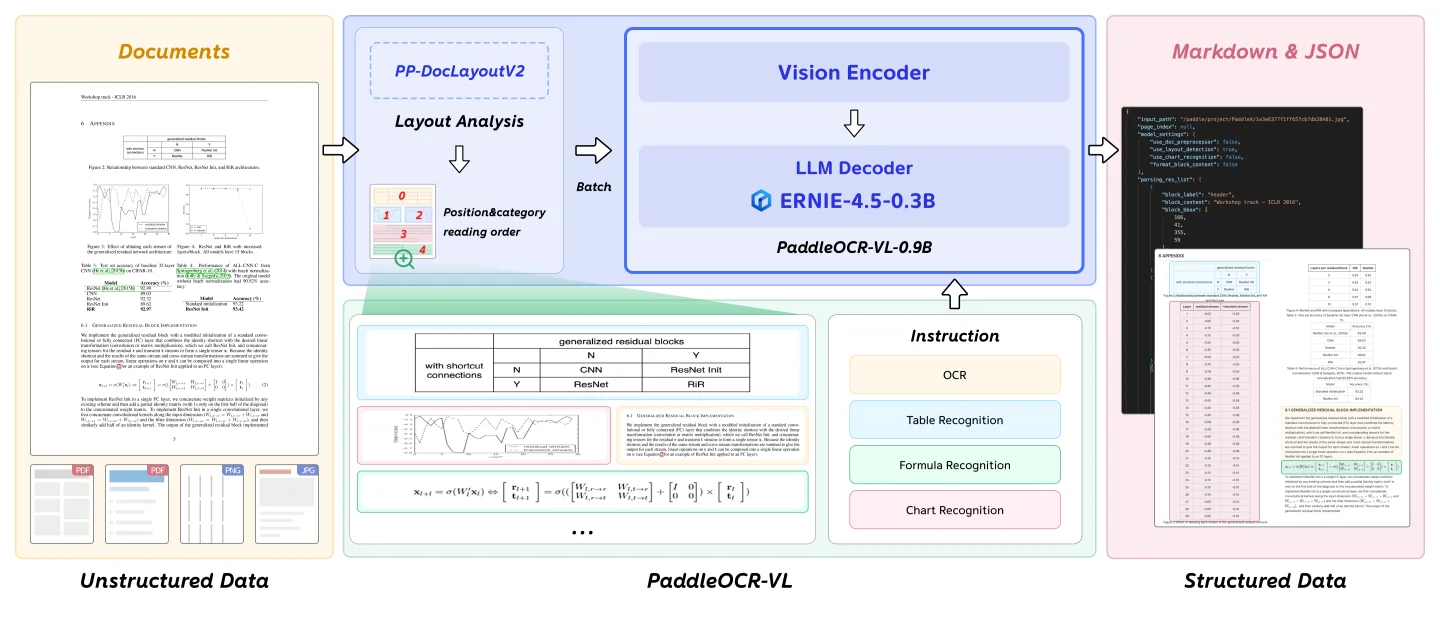
Architecture: Hybrid two-stage pipeline that separates layout analysis from content recognition:
- Stage 1 - Layout Analysis: PP-DocLayoutV2 detects and localizes document elements, classifying them by type and predicting reading order
- Stage 2 - Content Recognition: 0.9B VLM processes cropped regions using task-specific prompts ("OCR:", "Table Recognition:", "Formula Recognition:", "Chart Recognition:")
- Vision Encoder: NaViT-style dynamic resolution encoder handles variable document sizes without tile-based splitting
- Language Model: ERNIE-4.5-0.3B provides multilingual capabilities while keeping parameters low
This differs from pure end-to-end models that process entire pages in a single forward pass. The hybrid approach trades single-pass elegance for better control over difficult elements.
Training: Two-stage approach across diverse multilingual datasets:
- Stage 1: 29M samples at 1280×28×28 resolution for foundational multimodal alignment between vision and language models
- Stage 2: 2.7M high-quality samples at 2048×28×28 resolution with task-specific instruction fine-tuning
Training data spanned 109 languages including Chinese, English, Japanese, Korean, Russian (Cyrillic), Arabic, Hindi (Devanagari), and Thai. Documents included printed text, handwritten materials, historical documents, academic papers with formulas, business reports with tables, and 11 chart categories.
Key Innovation: Extreme multilingual coverage in a compact model. PaddleOCR-VL supports 109 languages, including scripts that many OCR systems struggle with like Cyrillic, Arabic, Devanagari, and Thai. The 0.9B parameter size means faster inference and lower memory requirements compared to 3-9B competitors, which matters for deployment at scale or on constrained hardware.
The trade-off is that the pipeline requires multiple model calls per page, adding preprocessing overhead compared to pure end-to-end models. They recommend to use official vLLM model deployment as mentioned in the documentation for maximum throughput.
DeepSeek-OCR (Released October 2025)
DeepSeek-OCR came from DeepSeek-AI in October 2025, built on a custom architecture that prioritizes extreme token efficiency over raw parameter count. The model totals 3B parameters (570M active) using a DeepSeek-3B MoE decoder, but the real innovation lives in the DeepEncoder vision system that compresses document images by up to 16×. DeepSeek-OCR was built to test a specific research question: can visual tokens serve as compressed representations of text more efficiently than text tokens themselves?
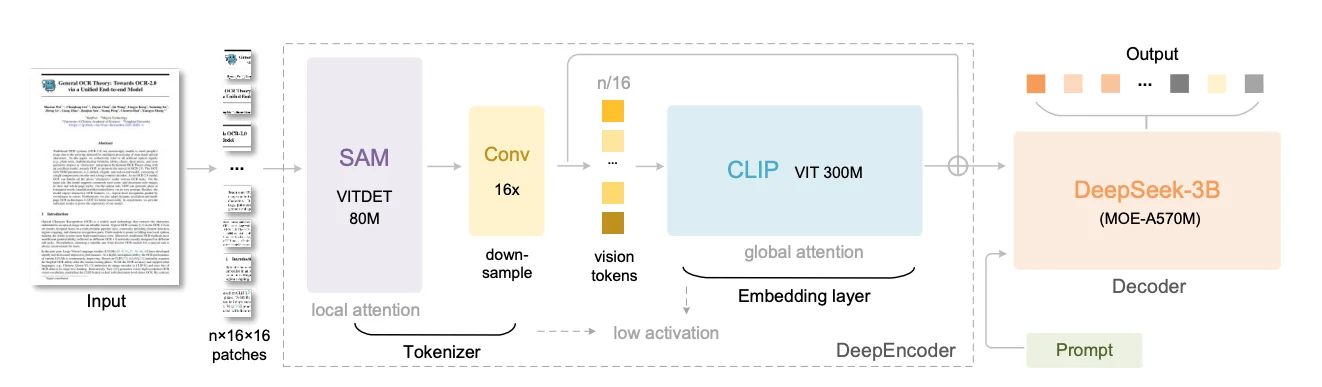
Architecture: Custom two-stage design pairing DeepEncoder (380M parameters) with DeepSeek-3B-MoE (570M active from 3B total). DeepEncoder chains three specialized components in series:
- SAM-base (80M): Meta's Segment Anything Model encoder using window attention to capture document structure with low activation memory at high resolutions
- 16× Token Compressor: Two-layer convolutional module that aggressively downsamples tokens through 3×3 convolutions with stride 2, reducing 4,096 patch tokens from a 1024×1024 image to just 256 tokens
- CLIP-large (300M): Applies global attention to compressed tokens, extracting semantic knowledge about document contents
The serial connection means SAM handles computationally expensive high-resolution processing with cheap local attention, while CLIP operates on already-compressed tokens with dense global attention. The decoder uses mixture-of-experts architecture where only 570M of 3B total parameters activate per input, keeping inference fast while maintaining model capacity.
Key Innovation: Six resolution modes that trade accuracy for speed by controlling vision token count. DeepSeek-OCR supports:
- Tiny (512×512, 64 tokens): Simple documents
- Small (640×640, 100 tokens): Standard documents
- Base (1024×1024, 256 tokens): Detailed content
- Large (1280×1280, 400 tokens): Dense text and complex layouts
- Gundam (dynamic multi-tile, 100 tokens per tile + 256 context): Mixed-complexity documents
- Gundam-Master (higher resolution dynamic tiling): Maximum detail
The compression results are really good: at compression ratios under 10× (10 text tokens represented by 1 vision token), the model achieves 97% OCR precision. Even at extreme 20× compression, accuracy remains around 60%. This directly addresses the central bottleneck in VLM-based OCR where attention computation scales quadratically with token count. Most vision encoders generate thousands of vision tokens per page, while DeepSeek-OCR generates 64-400 tokens depending on mode. This model is best for high-throughput batch processing where speed matters, large-scale digitization projects and memory-constrained deployments.
Chandra (Released October 2025)
Chandra came from Datalab in October 2025, built on a fine-tuned Qwen-3-VL vision-language model to address limitations the team found in their previous OCR tools. The model totals 9B parameters and scored 83.1 ± 0.9 on olmOCR-Bench, currently the highest score among all open-source models tested as of October 2025. Datalab had released Marker and Surya earlier, two popular pipeline-based OCR tools with around 50,000 combined GitHub stars, but kept hearing the same feedback: pipeline approaches struggled with handwriting in forms, complex layouts, and extracting images with proper context.
Architecture: Fine-tuned vision-language model with 9B total parameters. Datalab trained Chandra with a focus on specific pain points identified through customer feedback:
- Forms with handwritten entries
- Degraded scans and historical documents
- Complex tables spanning multiple cells
- Math equations in various fonts
- Documents with embedded images needing captions
The training emphasized layout awareness throughout, teaching the model to understand not just what content exists but where it appears and how elements relate spatially. The model processes entire pages at once rather than breaking them into blocks, preserving context that pipeline approaches lose. Outputs come in Markdown, HTML, or JSON formats with detailed layout information.
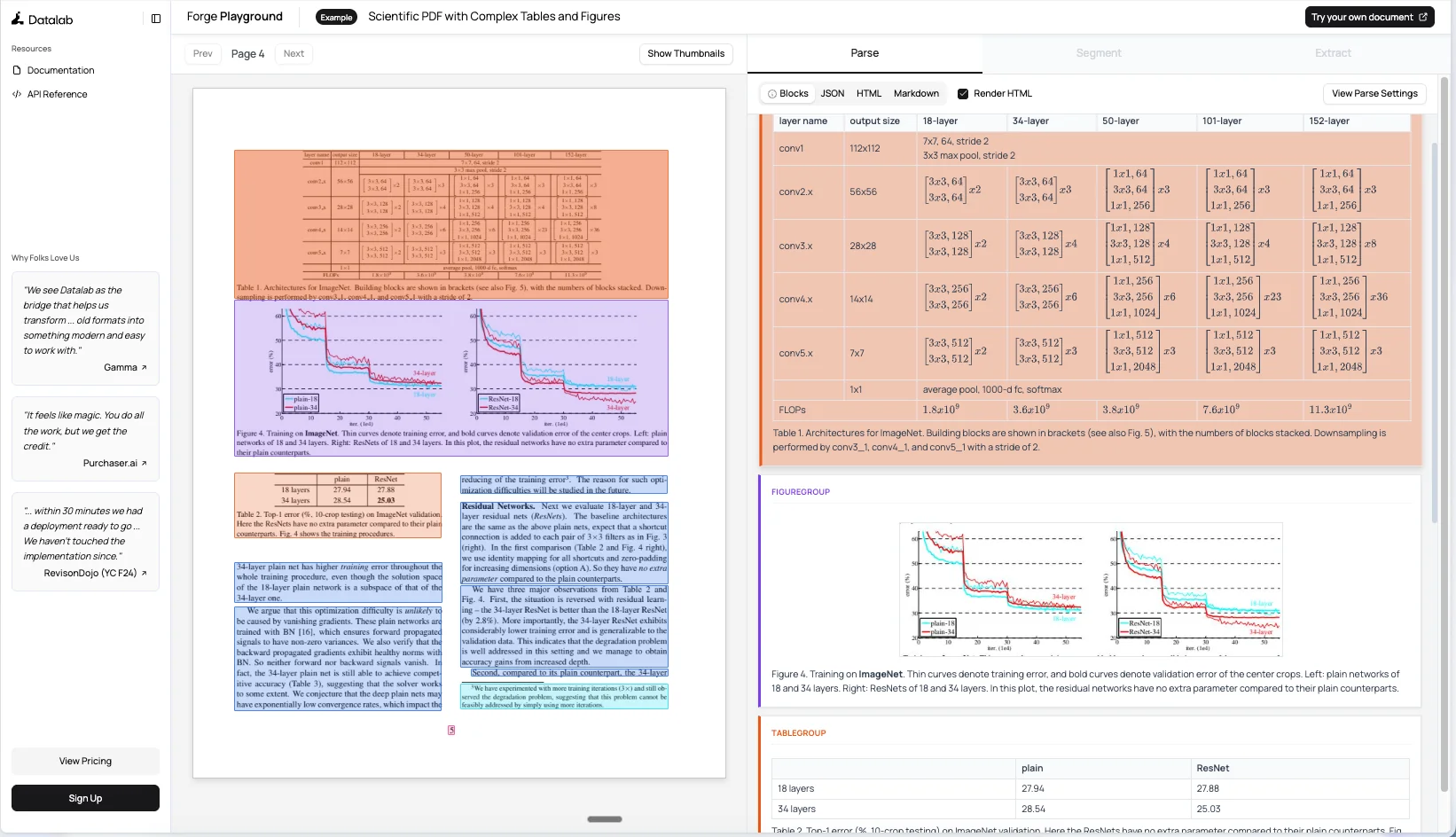
Key Innovation: Layout awareness combined with grounding capabilities that go beyond basic text extraction. Chandra understands document structure and identifies what each element is and where it lives on the page. The model can extract images from documents and generate captions that describe content in context. For tables, it pulls out structured data while preserving organizational logic. Forms get special handling for checkboxes, correctly identifying checked, unchecked, and crossed states. The grounding capability provides spatial layout information for detected elements alongside content.
You can see how an example scientific paper gets rendered with rich layout details in their playground.
Math support got particular attention during development. The team labeled real-world math data and generated synthetic samples, ensuring the model handled old fonts and handwritten equations. Tables work through full-page decoding rather than cell-by-cell approaches, handling complex cases like text written across cells or unusual table structures. Best for production deployments requiring high accuracy on complex documents with mixed content types, multilingual support across 40+ languages, and workflows where layout preservation is critical.
OlmOCR-2 (Released October 2025)
OlmOCR-2 came from Allen Institute for AI in October 2025, built on Qwen2.5-VL-7B-Instruct . The model scored 82.4 ± 1.1 on olmOCR-Bench, achieving state-of-the-art performance while keeping data, models, and code fully open. Ai2 solved a fundamental training challenge: how do you train an OCR model when your training signal itself depends on imperfect OCR? The team developed a synthetic data pipeline where Claude Sonnet 4 renders clean HTML versions of real PDF pages, creating verifiable ground truth with programmatic unit tests at $0.12 per page.
Architecture: Fine-tuned Qwen2.5-VL-7B-Instruct trained in two stages:
- Stage 1 - Supervised fine-tuning: olmOCR-mix-1025 dataset with 270,000 PDF pages covering academic papers, historical scans, legal documents, and brochures. Includes 20,000 pages of difficult handwritten and typewritten documents.
- Stage 2 - Reinforcement learning: Group Relative Policy Optimization (GRPO) on olmOCR-synthmix-1025 (2,186 pages with 30,381 test cases). Model generates 28 completions per document, each scored by unit tests. Reward is the fraction of passing tests (0.0 to 1.0). Six models trained with different random seeds, then weights averaged using model souping.
- Output format: Vision encoder processes page image, language decoder generates a YAML header plus structured text: Markdown (document structure), HTML (tables), and LaTeX (equations). Switched from JSON to YAML to reduce retry rates and repetition loops.
Key Innovation: Reinforcement learning with binary unit tests as rewards rather than continuous metrics like edit distance:
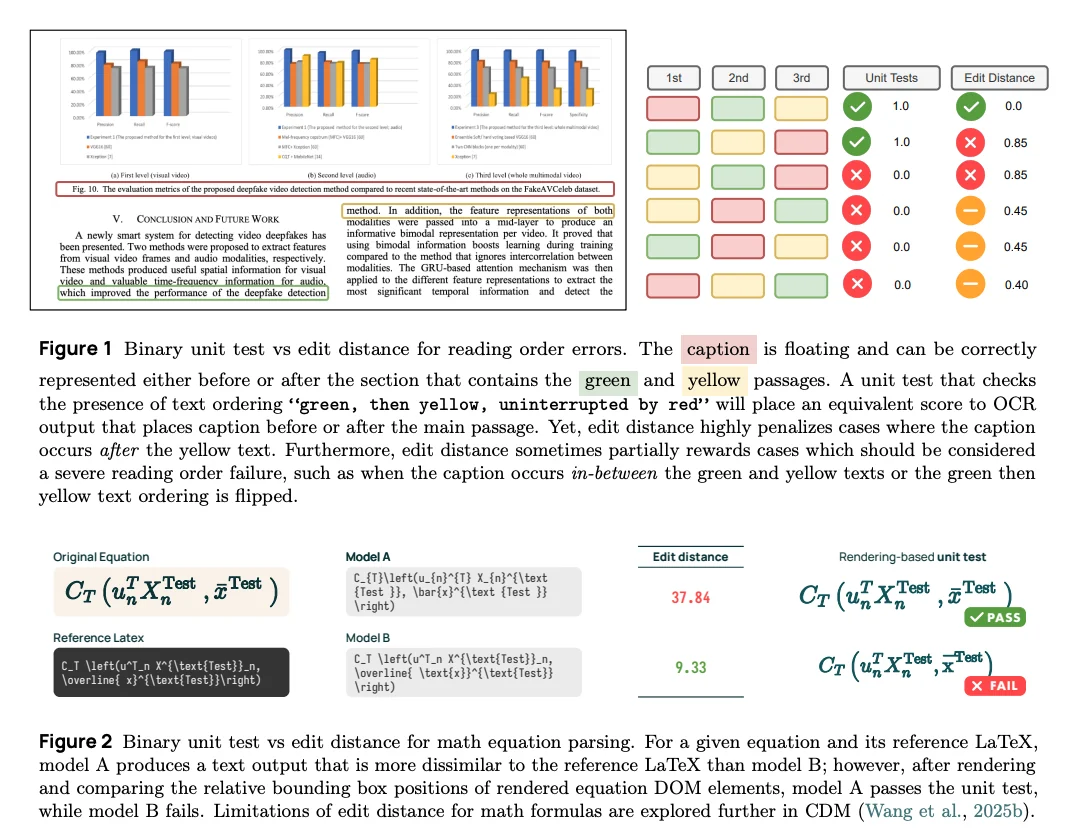
- Floating elements: Edit distance penalizes captions or figures appearing in different valid locations differently, even though they're equally correct.
- Math equations: Edit distance measures LaTeX string similarity, which doesn't correlate with rendering correctness. Minor formatting differences can have high edit distance but render identically, or vice versa.
- Unit test advantage: Renders LaTeX and checks visual element positions, catching actual errors edit distance misses. Enables automatic generation of thousands of test cases from synthetic HTML without manual verification.
The FP8 model achieves 3,400 output tokens per second on a single H100. Available in BF16 and FP8 versions with complete toolkit including inference pipelines, batch processing, and fine-tuning scripts. Hosted on DeepInfra, Parasail, and Cirrascale. This model is best for production English document processing, large-scale batch jobs, and organizations wanting fully open infrastructure (Apache 2.0 for models and code, ODC-BY for datasets).
LightOn OCR (Released October 2025)
LightOn OCR came from LightOn AI in October 2025, designed specifically to solve a problem most recent OCR models face: complex multi-stage pipelines that perform well on benchmarks but resist adaptation to new document types or domains. The model totals 1B parameters and scored 76.1 on olmOCR-Bench. The model demonstrates practical fine-tunability.
Architecture: Combines three components:
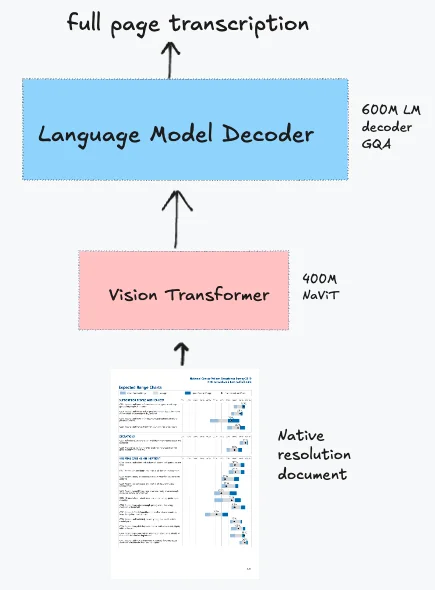
- Vision encoder: Native-resolution ViT initialized from Pixtral (specifically Mistral 3.1 ViT) with NaViT-style handling and no tiling. PDFs rendered at 200 DPI with a max dimension of 1540px.
- Language model: Qwen3 architecture for text generation
- Projection layer: Randomly initialized layer that downsamples vision tokens by 4× before feeding to the language model, reducing computational requirements. Removes image break and image end tokens to simplify the architecture.
- Training approach: Knowledge distillation from Qwen2-VL-72B-Instruct on a large-scale PDF corpus covering scientific papers, books, receipts, invoices, tables, forms, handwritten text, plus real and synthetic scans. The team used the 72B teacher model rather than 7B, which improved performance by 11.8 points overall on olmOCR-Bench, with particularly strong gains on multi-column pages (+22.2), long tiny text (+12.9), and mathematical content (+17.0).
The model outputs full-page Markdown rather than HTML, which some benchmarks penalize but makes the output more practical for downstream processing. Single-stage training means you can fine-tune using standard VLM recipes without specialized pipeline knowledge.
Key Innovation: Simple end-to-end architecture that enables direct fine-tuning rather than requiring multi-component pipeline optimization. Most recent OCR models achieve benchmark performance through elaborate architectures with multiple specialized components, but these systems resist adaptation to new document types:
- Complex models: Multiple specialized modules, preprocessing heuristics, and correction logic that work well on training documents but resist adaptation
- LightOn OCR: Processes the entire page in one forward pass with no retry logic, no tiling, and no complex preprocessing pipelines
The simplicity extends to training: load your labeled data, run one epoch, and you get a model that handles your specific document types substantially better. The fine-tuning results prove the approach works. In a fine-tuning experiment starting from 68.2% on olmOCR-Bench, a single epoch pushed performance to 77.2%, a 9-point improvement. The gains concentrated on headers and footers (40.0% to 91.3%, +51 points) and long tiny text (66.1% to 87.8%, +21.7 points).
LightOn OCR is one of the fastest OCR models available, processing 5.71 pages per second on an H100 (roughly 493,000 pages per day).The team also released variants with pruned vocabularies (32k and 16k tokens instead of the full 151k vocabulary), offering 12% additional speedup for European languages with minimal accuracy loss. This makes it ideal for applications demanding high processing speed like large-scale digitization projects, batch document processing systems, and memory-constrained deployments where throughput matters more than peak benchmark scores.
Model Comparison & Selection Guide
Now that we've covered each model individually, let's compare them side-by-side to help you choose the right one for your specific use case.
Quick Comparison Table
| Model | Base Architecture | Parameters | Key Differentiator | Best For | Output Formats | Languages | OlmOCR Score |
|---|---|---|---|---|---|---|---|
| dots.ocr | Qwen2.5-VL fine-tuned | 3B (1.2B vision encoder + 1.5B LM) | Grounding capabilities, unified architecture, 100+ languages | Complex layouts, multilingual documents, spatial layout understanding, tables and formulas | Markdown, JSON | 100+ languages | 79.1 ± 1.0 |
| Nanonets OCR 2 | Qwen2.5-VL-3B | 4B | Semantic tagging, signature/watermark detection | Forms with signatures and checkboxes, documents with visual elements, LLM-ready outputs | Structured Markdown with semantic tags, HTML | English, Chinese, French, Arabic, and more | 69.5 ± 1.1 |
| PaddleOCR-VL | NaViT + ERNIE-4.5-0.3B | 0.9B | 109 languages, chart-to-HTML conversion, smallest size | Resource-constrained GPU servers, massive language coverage, high-throughput batch processing | Markdown, JSON, HTML | 109 | 80.0 ± 1.0 |
| DeepSeek-OCR | SAM + CLIP + DeepSeek-3B MoE | 3B (570M active) | 10× document compression, multi-resolution modes, general visual tasks | Variable document sizes, memory efficiency, high-throughput batch processing | Markdown, HTML | Nearly 100 | 75.7 ± 1.0 |
| Chandra | Qwen3-VL-8B-Instruct | 9B | 40+ languages, highest accuracy, strong layout awareness | Production deployments prioritizing accuracy, multilingual documents, complex layouts | Markdown, HTML, JSON | 40+ | 83.1 ± 0.9 |
| OlmOCR-2 | Qwen2.5-VL-7B-Instruct | ~7.7B | Unit-test training, batch-optimized, RLVR training | Large-scale English pipelines, high accuracy requirements, production batch jobs | Markdown, HTML, LaTeX, YAML | Primarily English | 82.4 ± 1.1 |
| LightOn OCR | Pixtral ViT + Qwen3 LM | 1B | Demonstrated fine-tunability, simple end-to-end architecture | Domain adaptation, customization via fine-tuning, simple inference pipelines | Markdown | Primarily European languages | 76.1 |
Running OCR Models on Your Infrastructure
Now that you understand the capabilities of each model, let's walk through how to deploy them for production use. When deploying document OCR at scale, GPU selection and configuration directly impact both processing speed and operational costs. There are two main approaches to running these OCR models:
Deployment Approaches
1. Offline Inference (Batch Processing)
Offline inference processes documents in batches on your own GPU infrastructure. You feed the model a collection of PDFs or images, and it processes them sequentially or in parallel batches.
Best for:
- Large-scale document digitization projects (millions of pages)
- Privacy-sensitive documents that cannot leave your network (healthcare, legal, financial)
- Cost optimization at scale (pay once for GPU time, process unlimited pages)
- Predictable workloads where you can schedule processing jobs
- Building document search indices or knowledge bases
Example use cases: Converting a historical archive to searchable text, processing monthly financial statements, digitizing medical records for a hospital system.
2. Online Inference (Real-time API)
Online inference runs the model as a service that responds to requests in real-time. Users or applications send documents via API calls and receive OCR results immediately.
Best for:
- Interactive applications where users upload documents and need immediate results
- Variable workloads with unpredictable traffic patterns
- Workflows requiring real-time document processing (customer onboarding, claim processing)
- Microservice architectures where OCR is one component in a larger system
Example use cases: Mobile app for scanning receipts, insurance claim processing portal, real-time invoice data extraction.
We'll start with offline batch processing, then cover online deployment patterns in the next section.
Offline Batch Processing with DeepSeek-OCR
For this walkthrough, we'll use DeepSeek-OCR as our example. DeepSeek-OCR is open-source (MIT license) and optimized for high-throughput batch processing with multiple resolution modes. The same general deployment process applies to all the models we covered, with minor variations in installation and configuration.
1. Setting Up Your GPU Instance
First, you'll need a GPU instance on the E2E Networks platform.
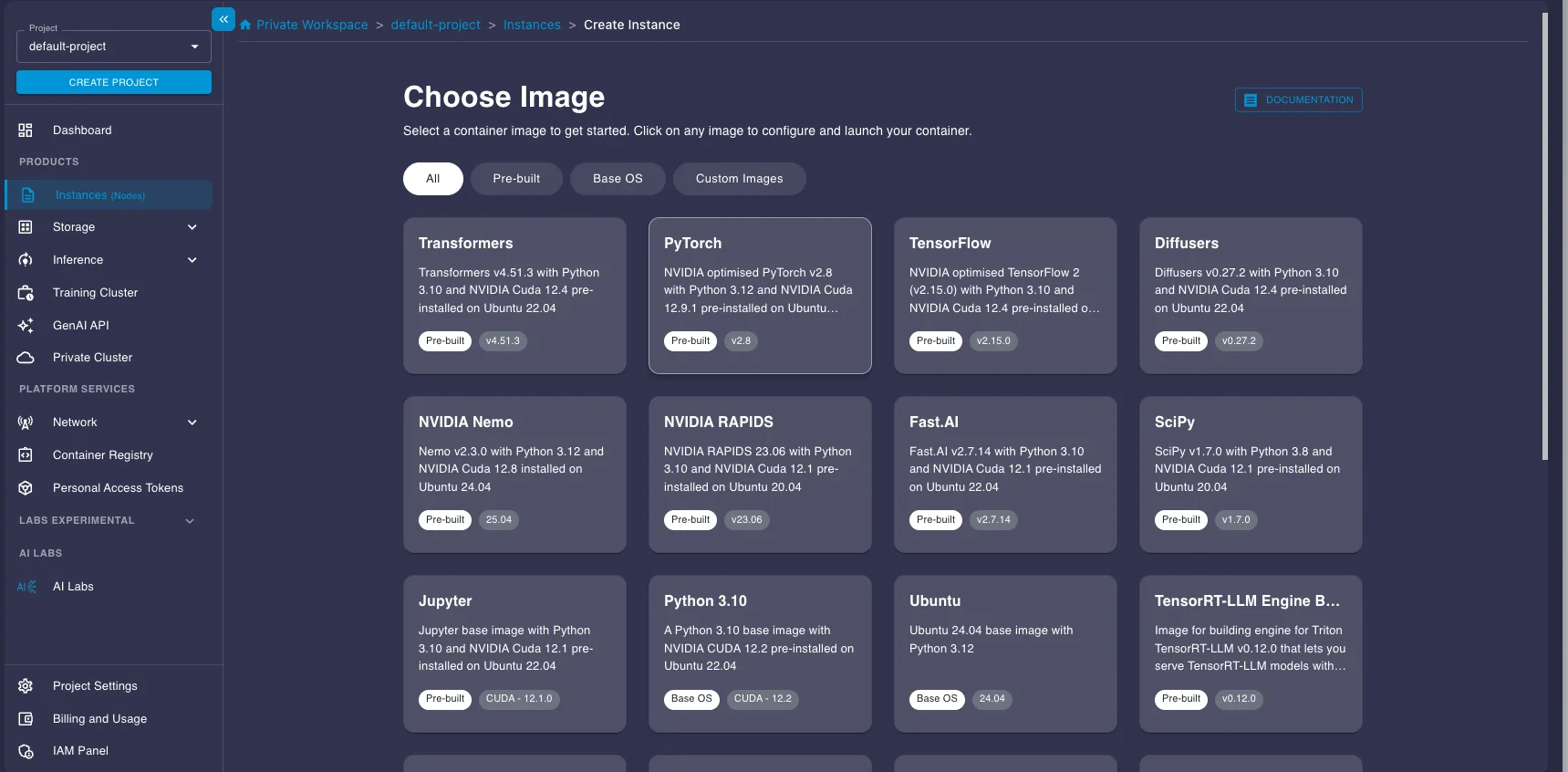
- Log in to your E2E Networks account and navigate to the Instances (Nodes) section under Products in the left sidebar.
- Click the CREATE INSTANCE button.

- You'll be asked to Choose Image. Select the PyTorch image under the Pre-built tab. This image comes pre-installed with NVIDIA drivers, CUDA, PyTorch, and other essentials, saving you setup time.
- Next, choose a Plan. Select a GPU instance suitable for running the model. Here we select an A100 instance.
- Choose your Instance Pricing. For cost savings, especially for batch jobs that don't need to run 24/7, select the Spot plan. Just be aware that spot instances can be interrupted.
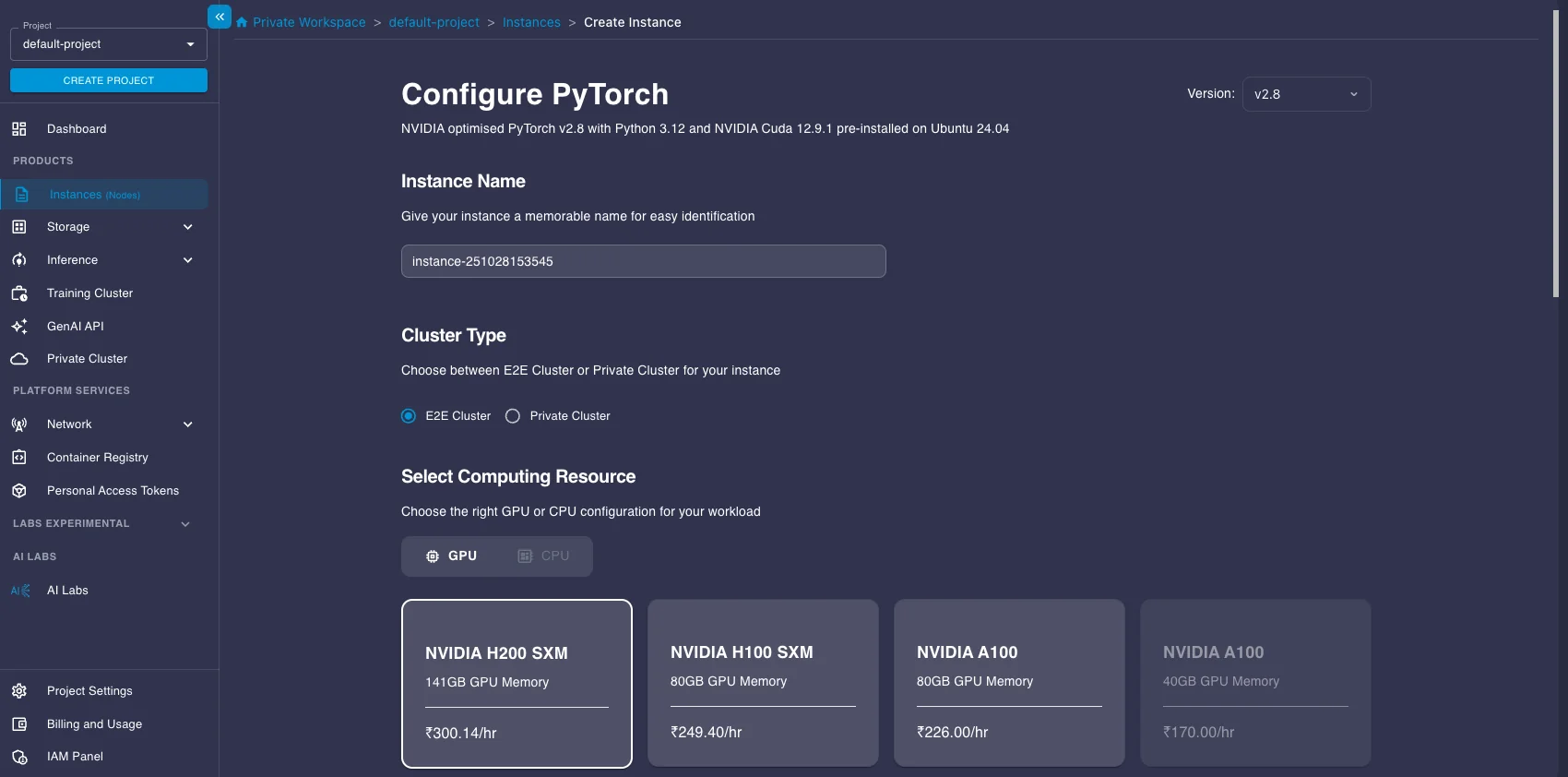
- Configure Storage (the default 30GB is likely enough to start, but add more if you have large datasets), add your SSH key for secure access, and configure any necessary Security Group settings.
- Click Launch Instance.
2. Connecting to Your Instance
Once your instance status shows as "Running," you can connect to it.
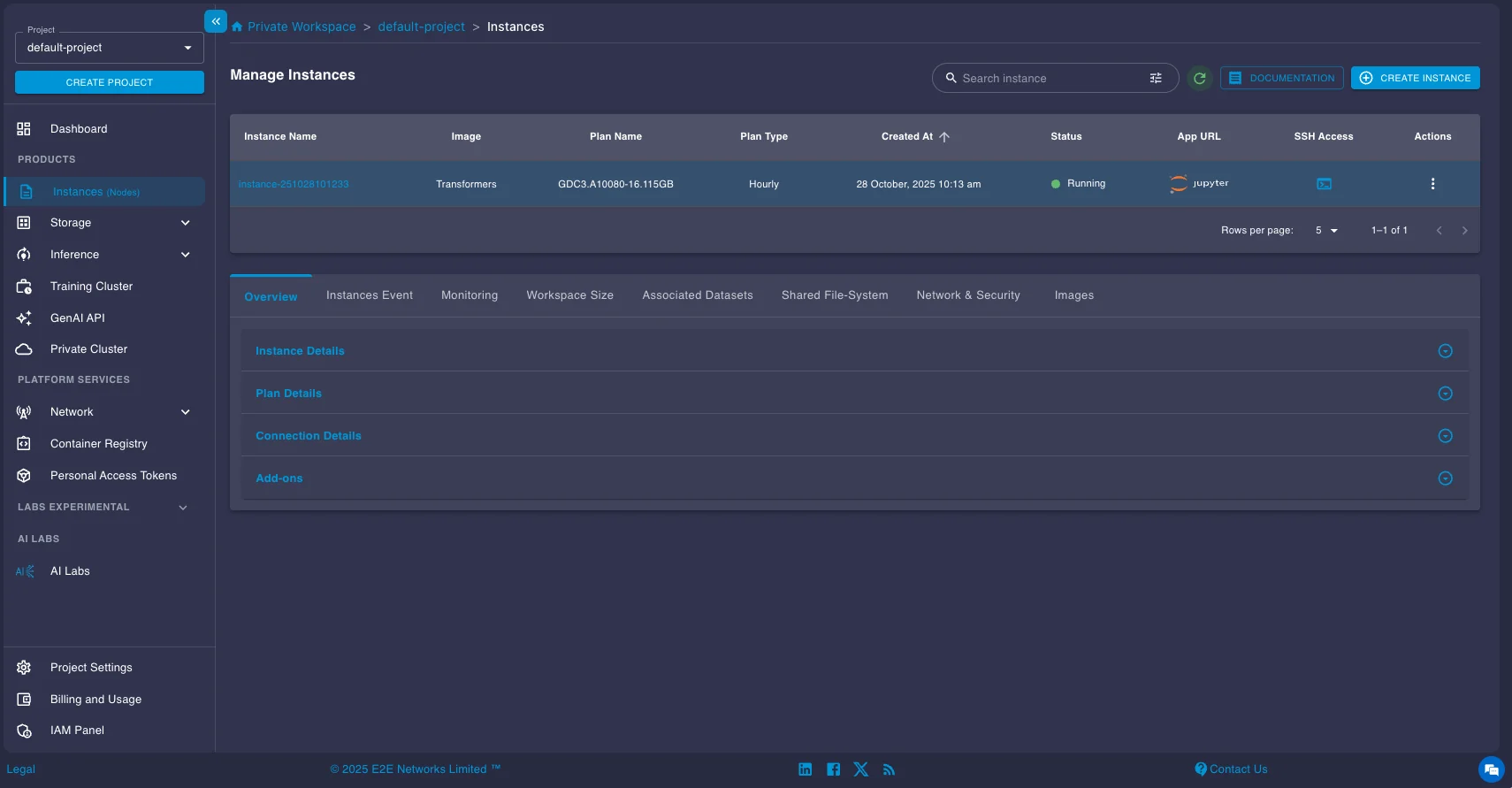
You have two main options:
- SSH: Use the provided SSH command in your local terminal or configure your favorite IDE (like VS Code with the Remote - SSH extension) to connect directly to the instance's IP address. This is usually the preferred method for development.
- Jupyter Lab: Click the Jupyter link provided in the instance details page to open a Jupyter Lab interface directly in your web browser.
3. Installing vLLM and Running the Model
DeepSeek-OCR requires the nightly build of vLLM as it was introduced recently. Open a terminal on your instance (either via SSH or within Jupyter Lab) and install it using pip:
pip install -U vllm --pre --extra-index-url https://wheels.vllm.ai/nightlyOnce you are done with the installation, you can now run the model. Here's a concise code snippet provided in the official vLLM documentation for running DeepSeek-OCR for batch processing:
from vllm import LLM, SamplingParams
from vllm.model_executor.models.deepseek_ocr import NGramPerReqLogitsProcessor
from PIL import Image

# Create model instance
llm = LLM(
    model="deepseek-ai/DeepSeek-OCR",
    enable_prefix_caching=False,
    mm_processor_cache_gb=0,
    logits_processors=[NGramPerReqLogitsProcessor]
)

# Prepare batched input with your image files
image_1 = Image.open("path/to/your/image_1.png").convert("RGB")
image_2 = Image.open("path/to/your/image_2.png").convert("RGB")
prompt = "<image>\\nFree OCR."

model_input = [
    {
        "prompt": prompt,
        "multi_modal_data": {"image": image_1}
    },
    {
        "prompt": prompt,
        "multi_modal_data": {"image": image_2}
    }
]

sampling_param = SamplingParams(
    temperature=0.0,
    max_tokens=8192,
    # ngram logit processor args
    extra_args=dict(
        ngram_size=30,
        window_size=90,
        whitelist_token_ids={128821, 128822},  # whitelist: <td>, </td>
    ),
    skip_special_tokens=False,
)

# Generate output
model_outputs = llm.generate(model_input, sampling_param)

# Print output
for output in model_outputs:
    print(output.outputs[0].text)
Running Other Models Similarly
The deployment process for the other OCR models we covered follows the same general pattern: set up a GPU instance, install dependencies (typically vLLM or the model's recommended inference framework), load the model, and run batch inference. Each model has its own specific configuration and prompts, which you can find in their respective HuggingFace model cards.
HuggingFace Model Cards:
Online Inference with Model Endpoints
For real-time applications where users need immediate OCR results, you'll want to deploy your model as an API service. Online inference runs the model as a persistent service that handles requests as they arrive, rather than processing documents in scheduled batches. The vLLM framework provides an OpenAI-compatible API server that delivers performance close to offline processing while handling continuous batching, request queuing, and dynamic scaling automatically in the background.
E2E Networks' Model Endpoints platform lets you deploy any of these OCR models as a managed vLLM service without manually configuring infrastructure. We'll walk through deploying Nanonets OCR 2 as an example, but the same process works for all the models covered in this guide.
Setting Up a Model Endpoint
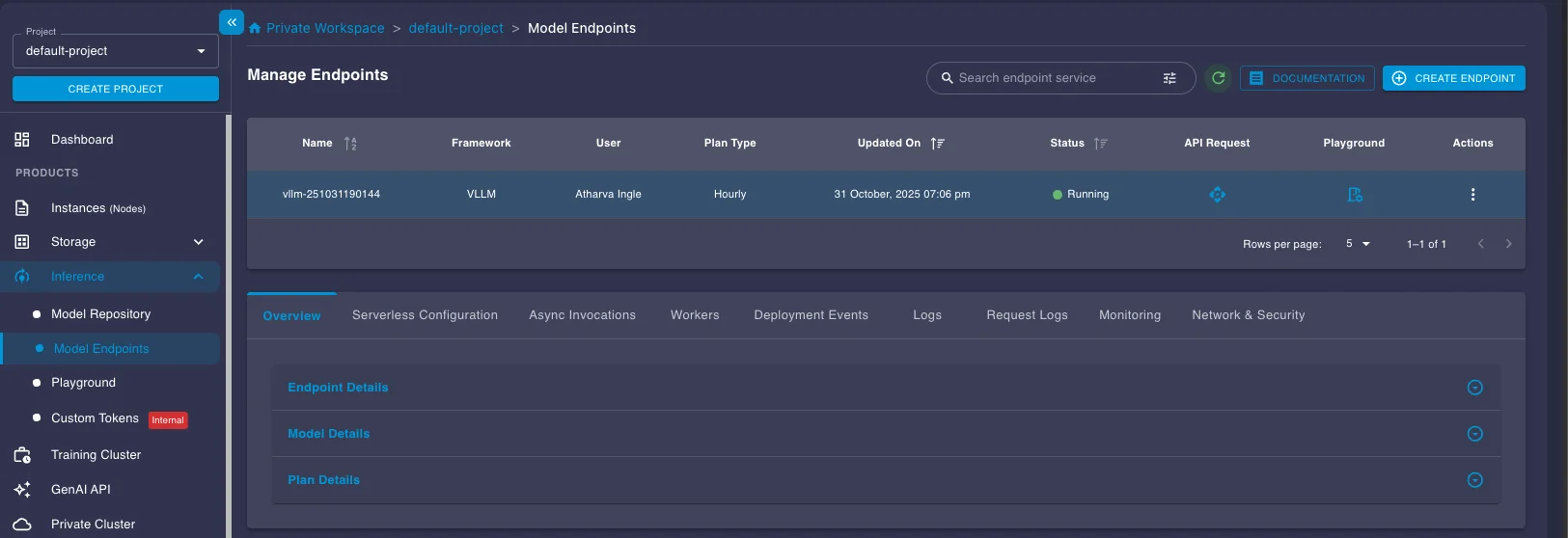
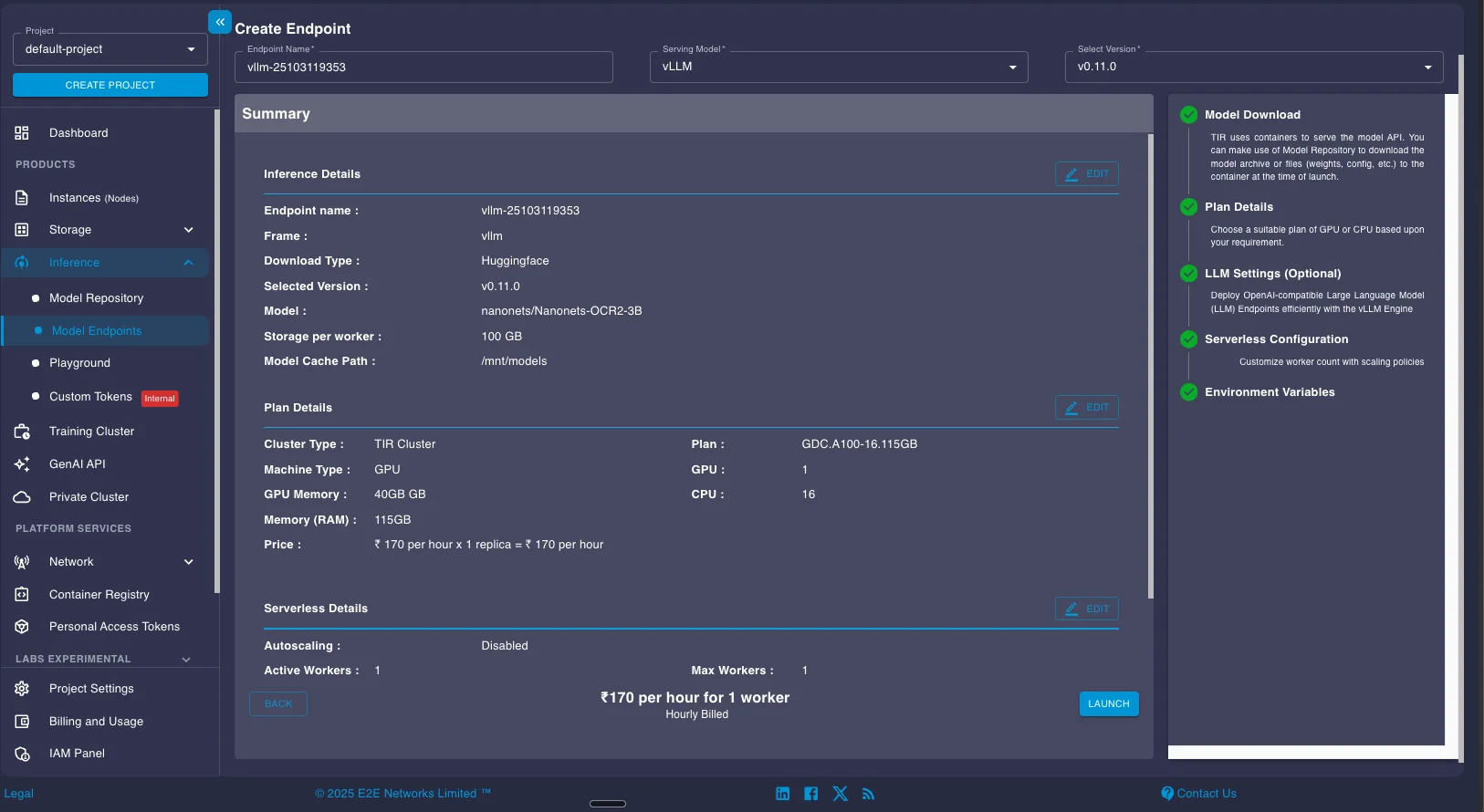
Navigate to the Model Endpoints section under Inference in the left sidebar. Click the CREATE ENDPOINT button in the top right.
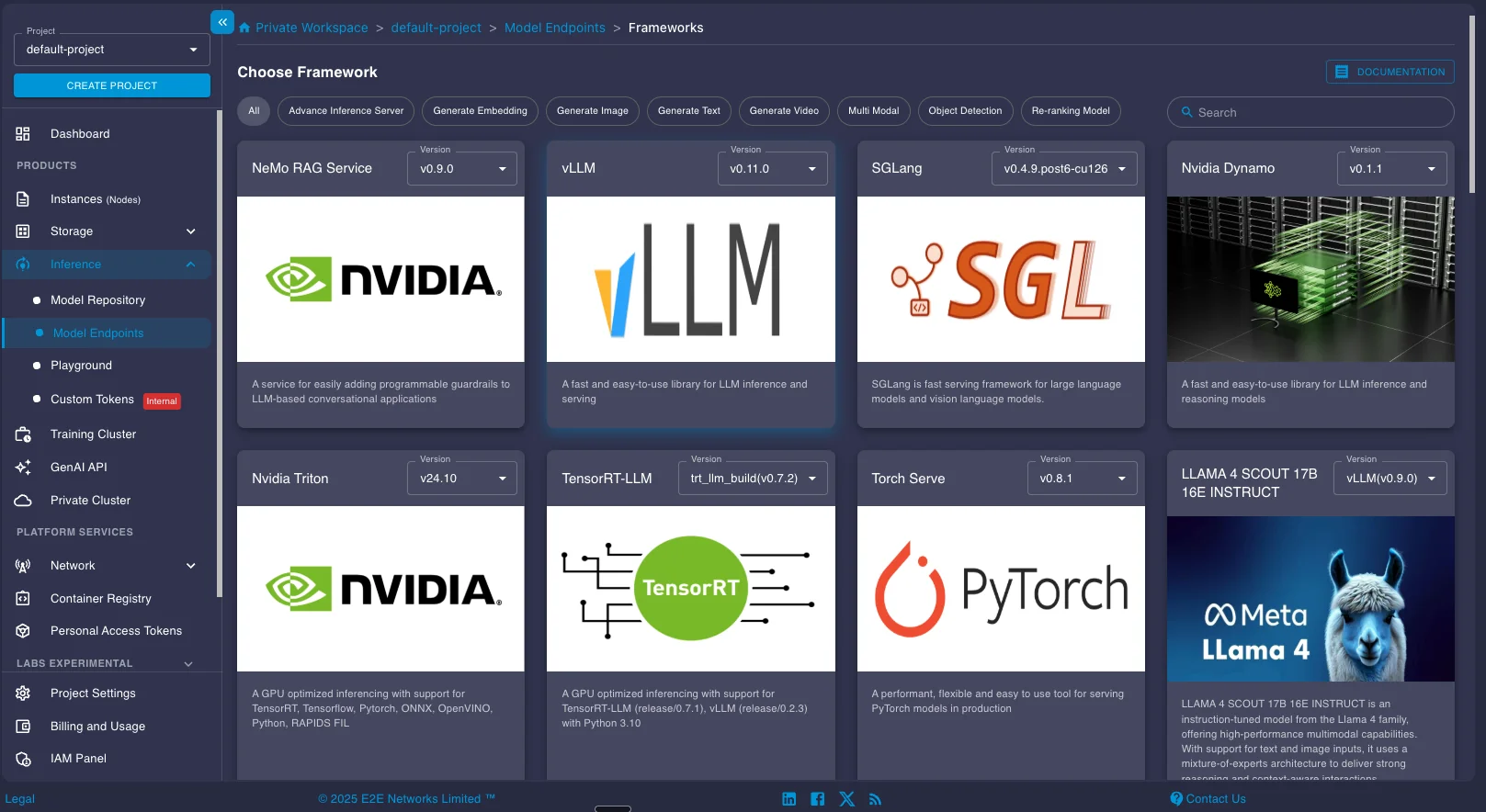
You'll be presented with multiple inference framework options including TensorRT-LLM, vLLM, SGLang, and others. Select vLLM and choose an appropriate version. For most recent OCR models, the latest stable version works well.
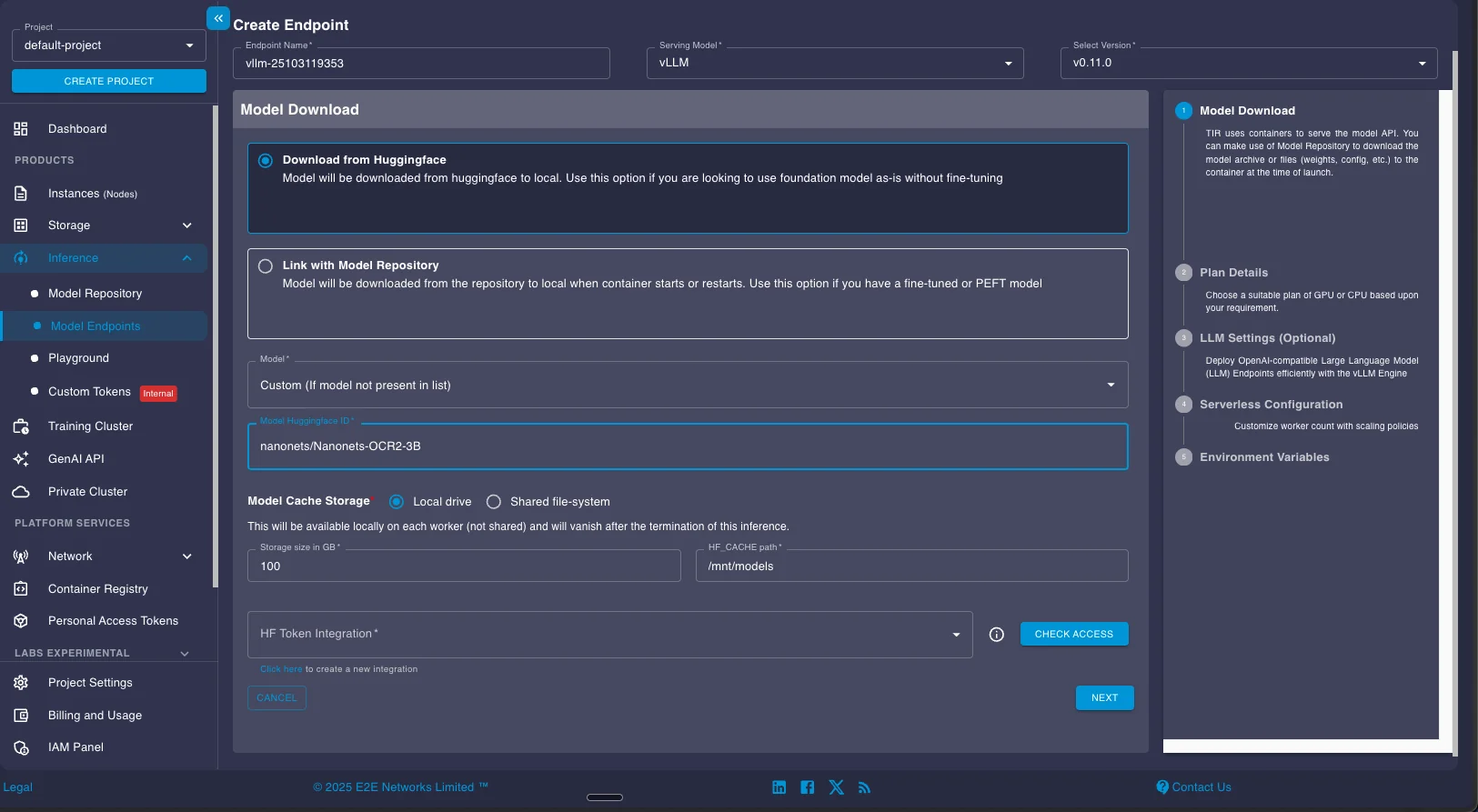
Next, configure your model download settings. Enter the HuggingFace model ID you want to deploy. For this example, we're using nanonets/Nanonets-OCR2-3B. If you're deploying a gated model that requires authentication, configure your HuggingFace token in the HF Token Integration field.
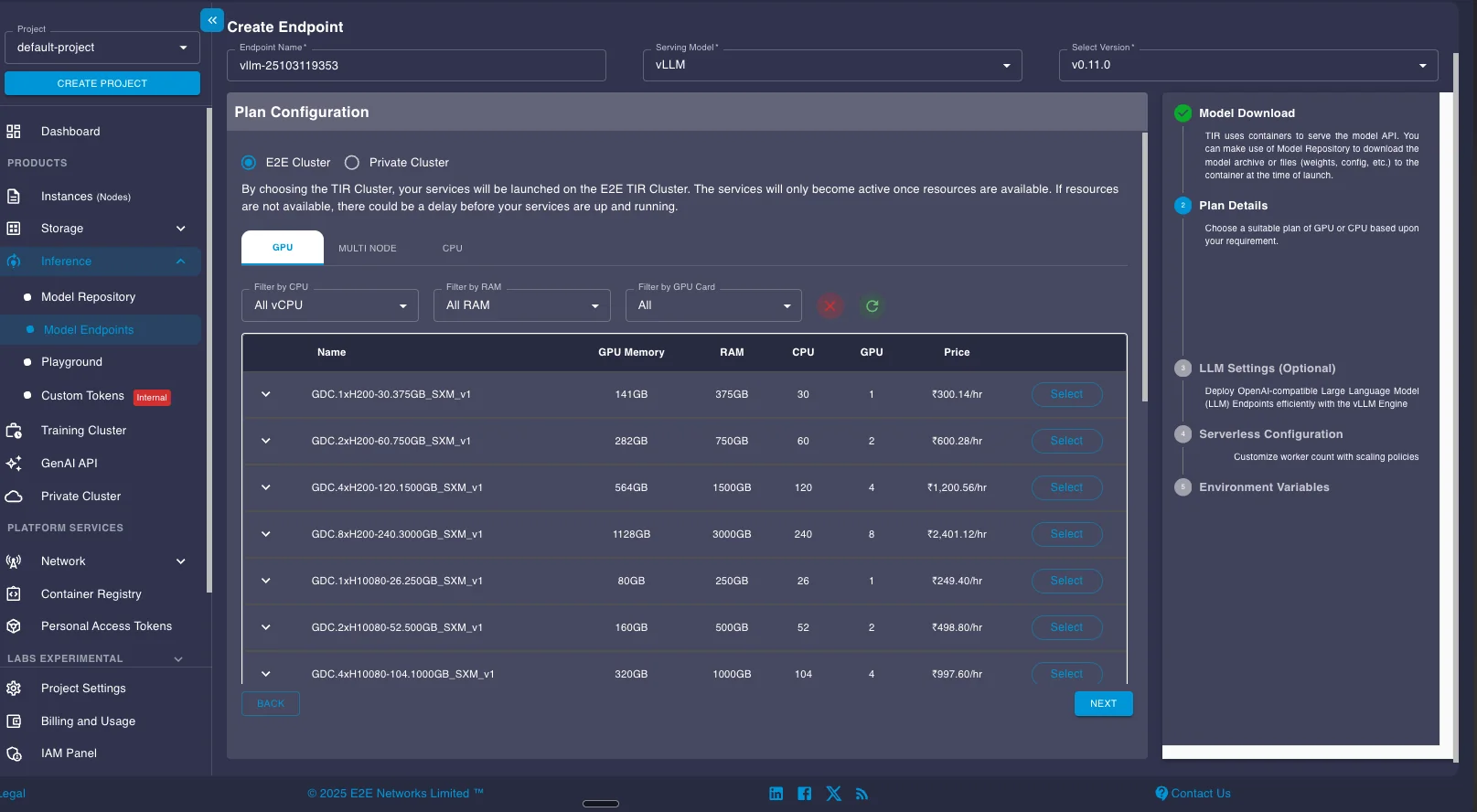
Select your GPU configuration. For Nanonets OCR 2 with its 4B parameters, a single A100 provides sufficient memory and throughput. Larger models like Chandra (9B) or OlmOCR-2 (8B) may benefit from higher-memory GPUs like the H100.
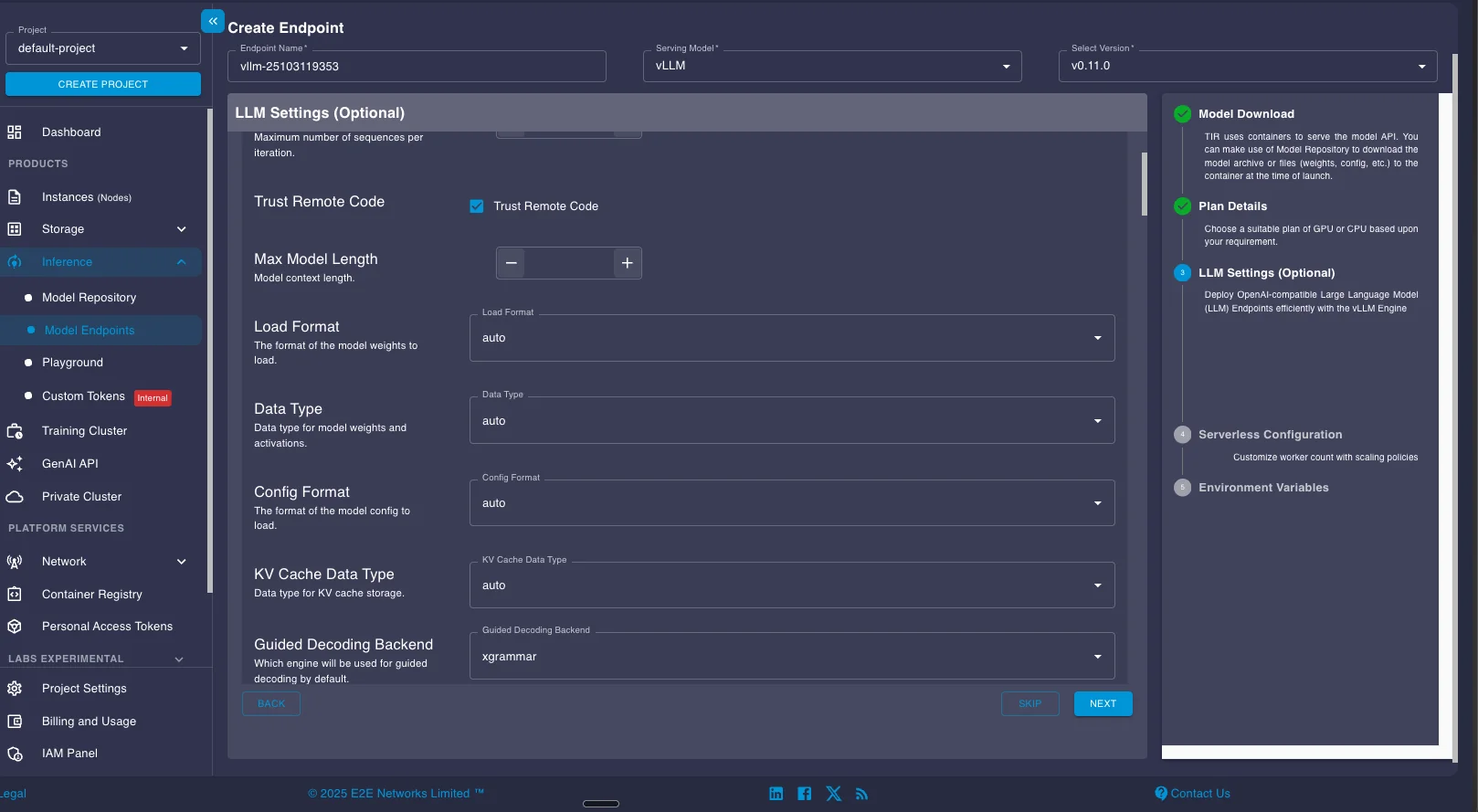
The next screen shows vLLM configuration options. These settings map directly to vLLM's command-line arguments and Python API parameters. You can adjust settings like maximum model length, tensor parallel size, data types, and KV cache configuration. For detailed explanations of each parameter, see the vLLM documentation. For most use cases, the default settings work well without modification.
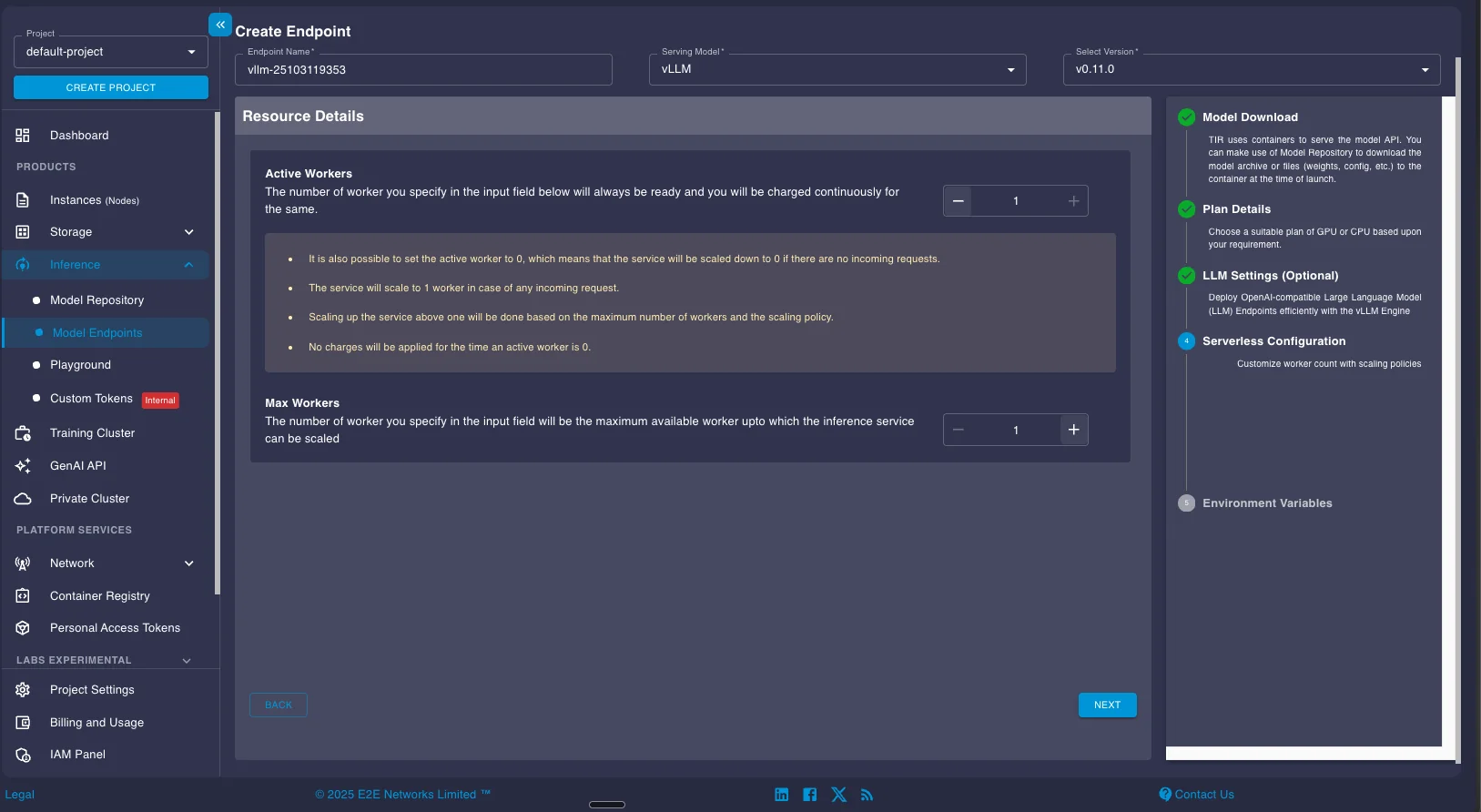
Configure your worker settings. The Active Workers field controls your baseline capacity. Setting it to 0 enables serverless mode, where the endpoint scales down to zero when idle and scales up automatically when requests arrive. This minimizes costs for variable workloads. For production deployments with consistent traffic, setting 1 or more active workers ensures the endpoint stays ready without cold start latency.
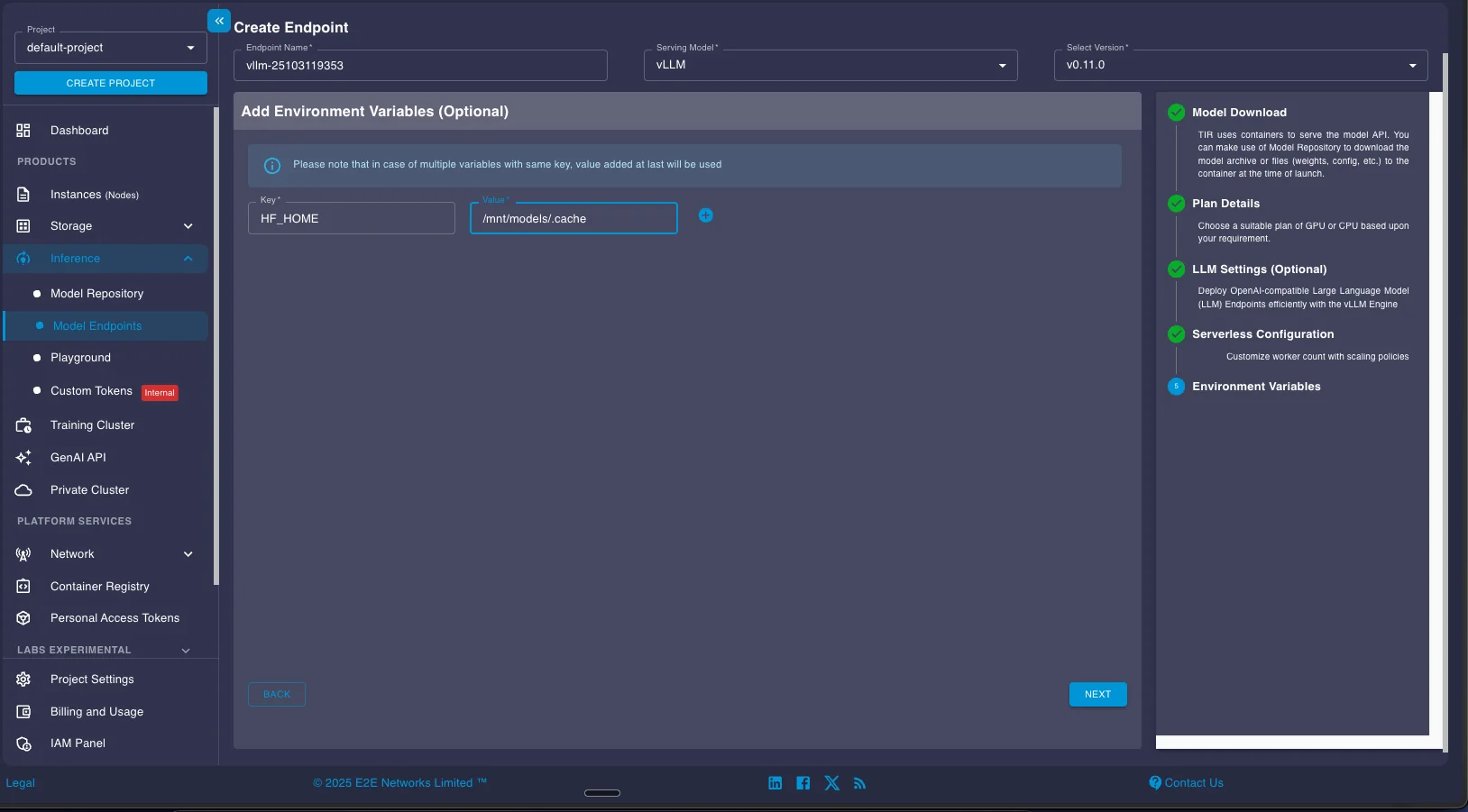
If your application needs environment variables (API keys, custom paths, configuration flags), add them in the Environment Variables section. These get passed to the vLLM container at startup.
Review the summary page showing your endpoint configuration, selected GPU plan, storage allocation, and hourly pricing. When everything looks correct, click LAUNCH to deploy the endpoint.
Using Your Deployed Endpoint
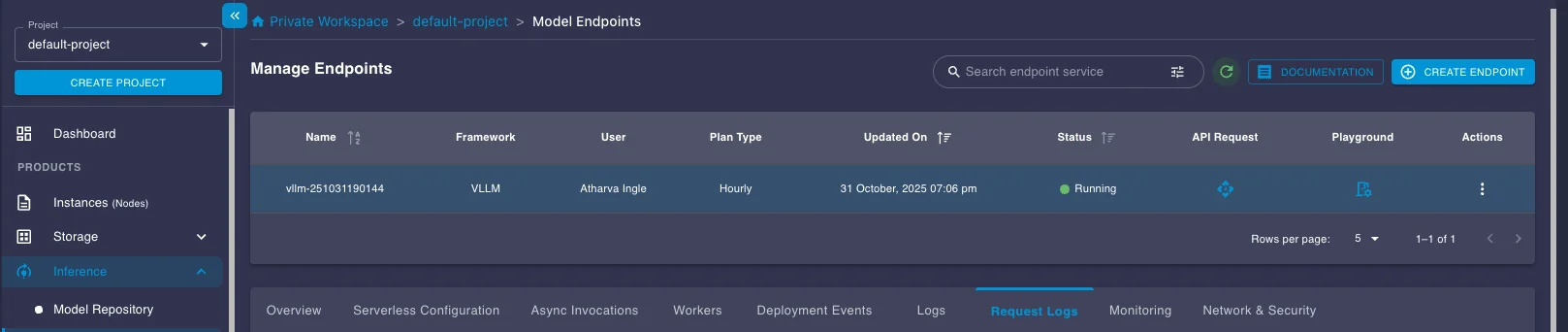
Once your endpoint status shows "Running," you can access it through the API or playground interface. Click on the API Request button in the endpoint details to see integration examples.
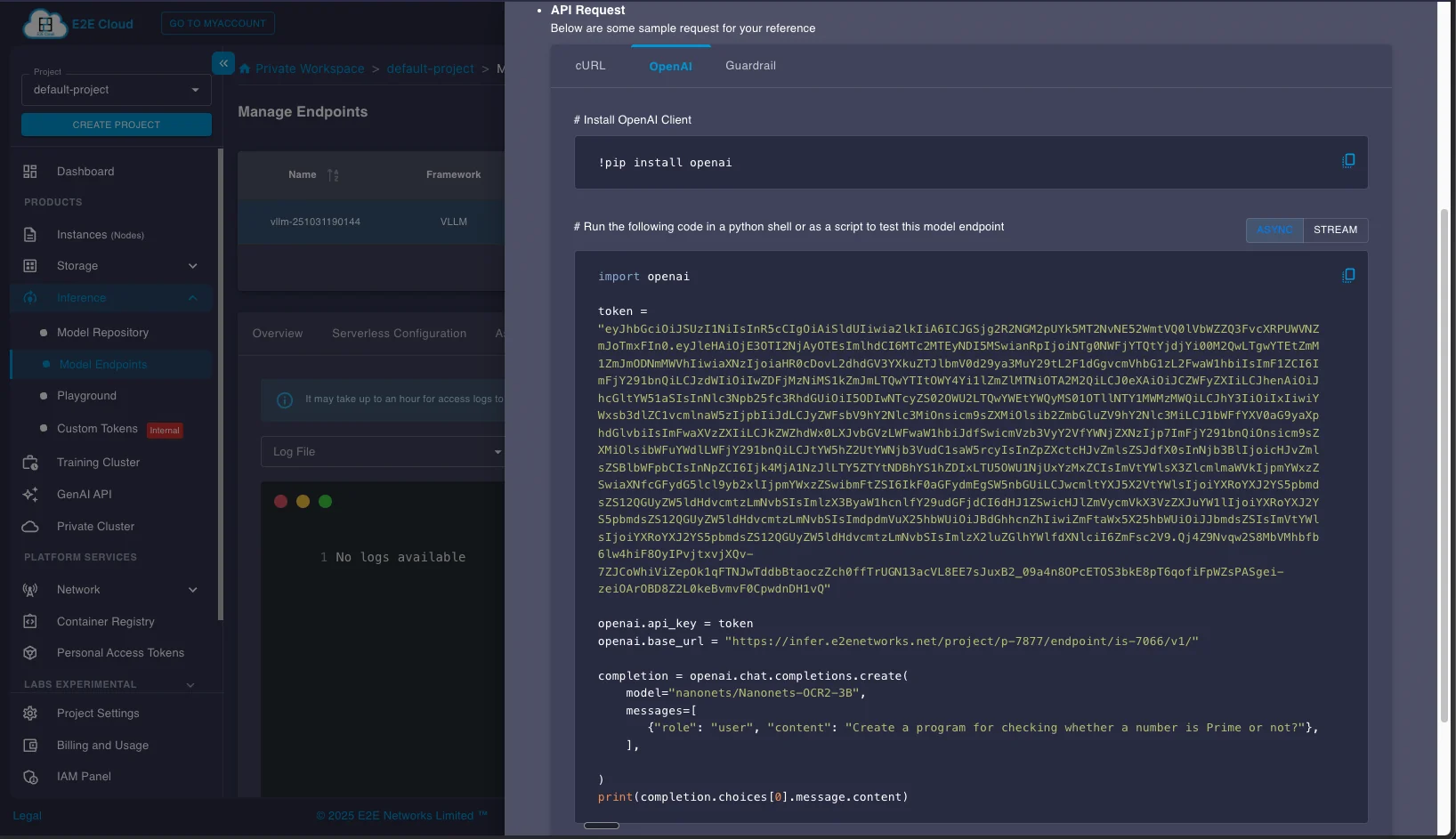
The API request panel provides sample code in multiple formats (OpenAI SDK, cURL). Copy your authentication token and base URL from this panel. These credentials are specific to your endpoint and required for all API calls.
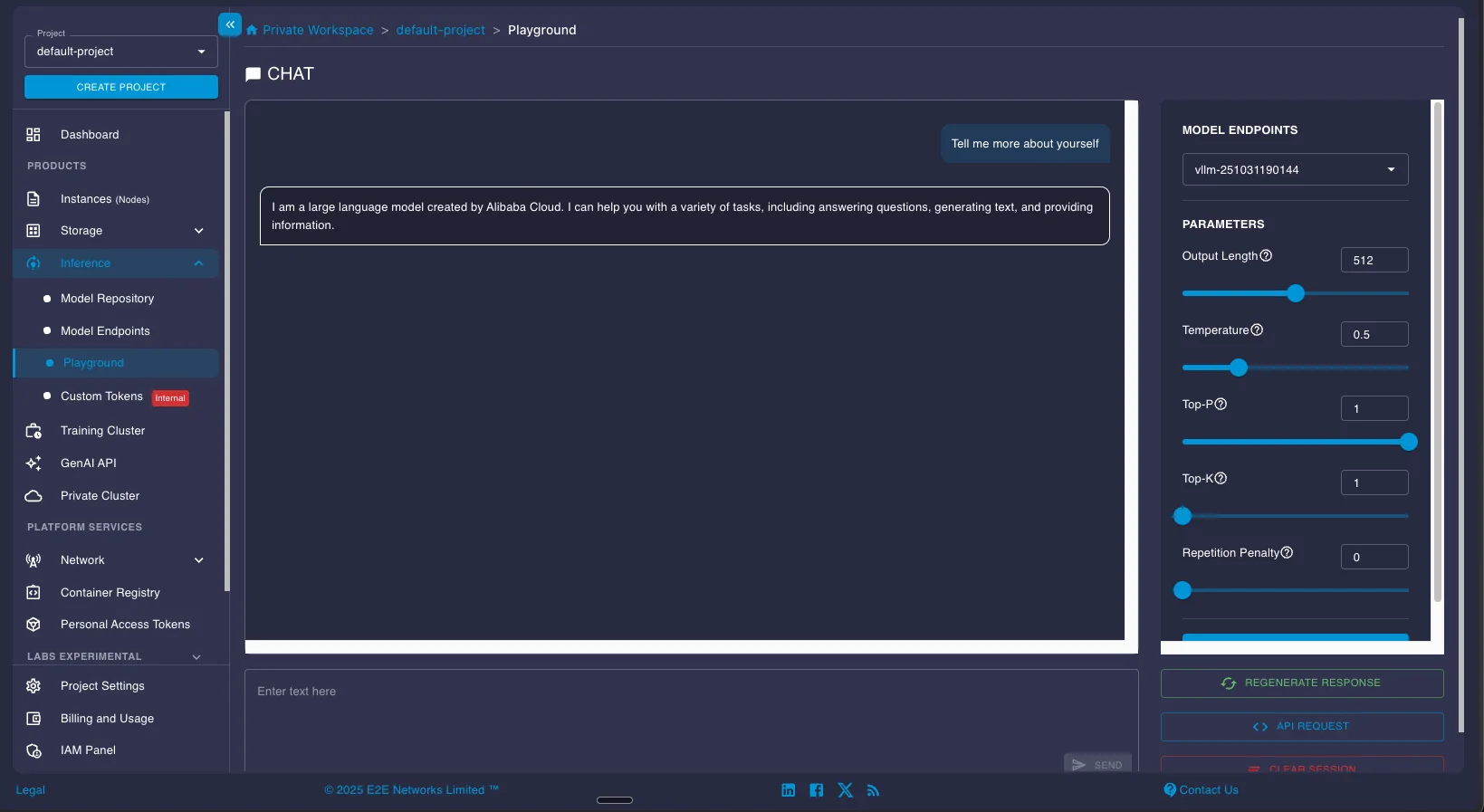
For quick testing, the Playground section provides a simple chat interface where you can test the model interactively.
Making API Requests
Here's a complete example showing how to use the deployed endpoint with the OpenAI Python SDK. The code encodes an image to base64 and sends it to the OCR model with a detailed prompt specifying the output format:
from openai import OpenAI
import base64

token = "<your_token_here>"
client = OpenAI(api_key=token, base_url="https://infer.e2enetworks.net/<your_server_url>")
model = "nanonets/Nanonets-OCR2-3B"

def encode_image(image_path):
    with open(image_path, "rb") as image_file:
        return base64.b64encode(image_file.read()).decode("utf-8")

def ocr_page_with_nanonets(img_base64):
    response = client.chat.completions.create(
        model="nanonets/Nanonets-OCR2-3B",
        messages=[
            {
                "role": "user",
                "content": [
                    {
                        "type": "image_url",
                        "image_url": {"url": f"data:image/png;base64,{img_base64}"},
                    },
                    {
                        "type": "text",
                        "text": "Extract the text from the above document as if you were reading it naturally. Return the tables in html format. Return the equations in LaTeX representation. If there is an image in the document and image caption is not present, add a small description of the image inside the <img></img> tag; otherwise, add the image caption inside <img></img>. Watermarks should be wrapped in brackets. Ex: <watermark>OFFICIAL COPY</watermark>. Page numbers should be wrapped in brackets. Ex: <page_number>14</page_number> or <page_number>9/22</page_number>. Prefer using ☐ and ☑ for check boxes.",
                    },
                ],
            }
        ],
        temperature=0.0,
        max_tokens=15000
    )
    return response.choices[0].message.content

# Process an image
test_img_path = "./image_1.png"
img_base64 = encode_image(test_img_path)
result = ocr_page_with_nanonets(img_base64)
print(result)
Here's an example showing the input image and the structured output generated by the model:
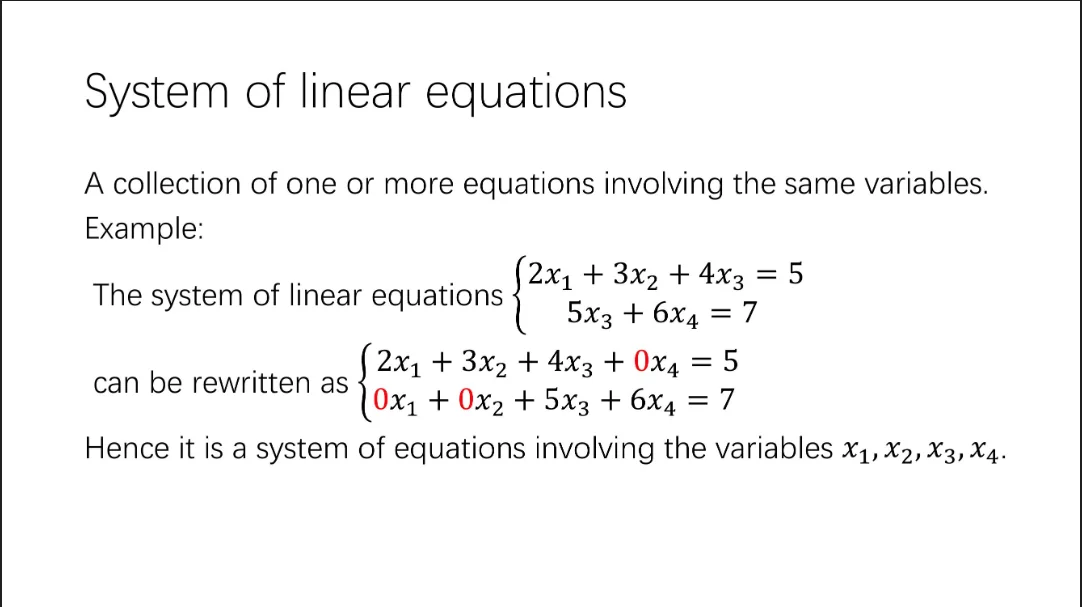
Output:
<header>System of linear equations</header>

A collection of one or more equations involving the same variables.

**Example:**

The system of linear equations
$$\begin{cases}
2x_1 + 3x_2 + 4x_3 = 5 \\
5x_3 + 6x_4 = 7
\end{cases}$$

can be rewritten as
$$\begin{cases}
2x_1 + 3x_2 + 4x_3 + 0x_4 = 5 \\
0x_1 + 0x_2 + 5x_3 + 6x_4 = 7
\end{cases}$$

Hence it is a system of equations involving the variables $x_1, x_2, x_3, x_4$.
The model correctly extracted the mathematical notation, preserved the equation structure in LaTeX format, and identified the header as semantic markup. This structured output is ready for downstream processing by LLMs or other applications.
All the OCR models covered in this guide can be deployed using the same process. Most models work with the standard vLLM configuration, though some may have specific requirements documented in their HuggingFace model cards. Check the individual model documentation for any custom deployment parameters or inference optimizations.
Results
We benchmarked all seven models on an H100 instance running on E2E Networks infrastructure at ₹362 ($3.77) per hour. The benchmark used olmOCR-Bench, a dataset of 1,403 PDF files covering diverse document types including arXiv papers with mathematical equations, multi-column layouts, tables, old scans with degraded quality, documents with headers and footers, and pages with long tiny text. This is one of the most comprehensive OCR benchmarks available. We converted PDFs to images at 200 DPI and measured throughput to calculate cost per million pages based on H100 pricing.
All models were deployed using vLLM following the official deployment guidelines and prompts from each model's creators to ensure maximum accuracy and throughput.
Performance Results
| Model | Pages/sec | Pages/hr | Pages/day | OlmOCR Score | Cost per 1M pages |
|---|---|---|---|---|---|
| LightOn OCR | 5.55 | 19,980 | 479,520 | 76.1 | $189 (₹18,118) |
| DeepSeek-OCR | 4.65 | 16,740 | 401,760 | 75.7 ± 1.0 | $225 (₹21,625) |
| PaddleOCR-VL | 2.20 | 7,920 | 190,080 | 80.0 ± 1.0 | $476 (₹45,707) |
| dots.ocr | 1.94 | 6,984 | 167,616 | 79.1 ± 1.0 | $540 (₹51,833) |
| OlmOCR-2 | 1.78 | 6,408 | 153,792 | 82.4 ± 1.1 | $588 (₹56,492) |
| Chandra | 1.29 | 4,644 | 111,456 | 83.1 ± 0.9 | $812 (₹77,950) |
| Nanonets OCR 2 | 1.12 | 4,032 | 96,768 | 69.5 ± 1.1 | $935 (₹89,782) |
Throughput vs. Accuracy Trade-offs
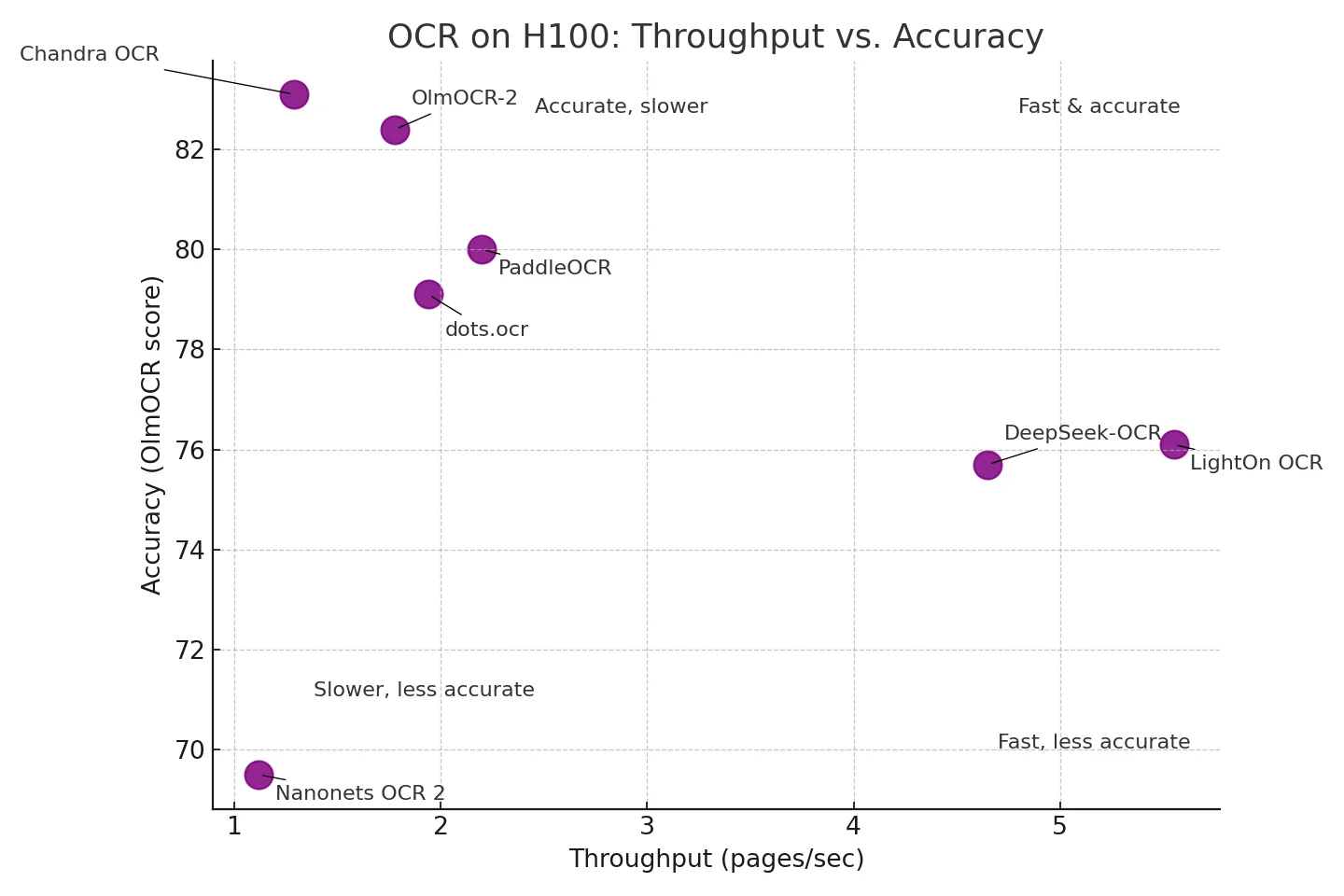
The visualization above shows how models balance processing speed against accuracy. Different models occupy distinct regions of the speed-accuracy space:
Fast & Accurate (top right):
- LightOn OCR leads in throughput at 5.55 pages/sec with 76.1 accuracy. While mid-pack on the benchmark, it can be fine-tuned on your dataset to match or exceed proprietary solutions. Processes 479,520 pages/day on a single H100.
- DeepSeek-OCR offers 4.65 pages/sec with 75.7 accuracy, plus six resolution modes to trade speed for accuracy per document.
Accurate, Slower (top left):
- Chandra achieves the highest accuracy at 83.1 but processes 1.29 pages/sec (111,456 pages/day).
- OlmOCR-2 scores 82.4 at 1.78 pages/sec (153,792 pages/day), balancing strong accuracy with reasonable throughput.
Middle Ground:
- PaddleOCR-VL and dots.ocr offer balanced performance around 2 pages/sec with 79-80 accuracy.
Cost Comparison: Self-Hosted vs. Cloud APIs
The cost difference between self-hosted models and proprietary APIs is substantial. Proprietary services like Azure Document Intelligence, AWS Textract, and Google Document AI charge $1,500 per million pages for basic text extraction at standard pricing. For structured data extraction with tables, forms, and layout analysis, costs jump to $10,000-$50,000 per million pages.
Self-hosted models running on H100 infrastructure cost far less. The cheapest option, LightOn OCR, processes a million pages for $189, making it 7.9× cheaper than standard cloud pricing. Even the most expensive model in our benchmark, Nanonets OCR 2 at $935 per million pages, still costs less than cloud services for basic text extraction.
The savings compound at scale. A company processing 10 million pages monthly would pay $100,000-$500,000 for cloud-based structured extraction versus $1,890-$9,350 for self-hosted models depending on which one you choose. With LightOn OCR running continuously on a single H100, you'd need roughly 21 days to process 10 million pages, or you could run multiple instances in parallel to finish faster.
Key Advantages
Beyond cost savings, self-hosted models give you ownership and control that proprietary APIs can't match. You can fine-tune models on your specific document types and domain terminology, adapting them to handle your unique layouts, fonts, or industry-specific language. Your data never leaves your environment, which matters for healthcare records, financial documents, or any content that can't be sent to third-party services for compliance reasons. There are no rate limits beyond your hardware capacity. Process documents as fast as your GPUs allow rather than waiting on API quotas.
Performance Considerations
These throughput numbers represent real-world performance on olmOCR-Bench documents converted at 200 DPI, but your actual speed will vary. Dense pages with small fonts and complex tables take longer to process than simple invoices. Higher resolution scans (300-400 DPI) slow inference, while lower resolution (100-150 DPI) runs faster but might miss fine details.
E2E Networks supports both deployment approaches:
- Continuous processing: Dedicated instances for high-volume daily workloads where you're constantly feeding documents into the system
- Batch processing: Serverless Model Endpoints that scale to zero when idle and spin up automatically for periodic workloads like monthly financial reports or quarterly archive digitization. You pay only for active GPU time, not idle capacity.
Frequently Asked Questions
Which free OCR is the best?
For simple text extraction, Tesseract remains popular and reliable. For complex documents with tables, multi-column layouts, and mixed content, modern VLM-based models like DeepSeek-OCR, PaddleOCR-VL, and OlmOCR-2 significantly outperform Tesseract. These newer models handle layout preservation and structured output that Tesseract struggles with.
Are these models better than Tesseract?
Yes. Tesseract OCR is the most well-known open-source OCR tool and has been popular for over a decade. However, the 2024-2025 models covered in this guide significantly outperform Tesseract, especially on complex documents. Modern VLM-based models like DeepSeek-OCR, PaddleOCR-VL, Nanonets OCR2, and OlmOCR-2 process pages end-to-end in a single pass, understanding spatial relationships and preserving document structure. Tesseract requires multi-stage pipelines that often fail on tables, equations, and multi-column layouts.
How much does OCR cost?
Cloud OCR APIs (Azure, AWS, Google) charge approximately $1.50 per 1,000 pages for basic text extraction. Self-hosted open-source OCR on GPU infrastructure costs around $0.09 per 1,000 pages on an A100 GPU, roughly 16x cheaper. At 10 million pages monthly, cloud APIs cost $15,000 while self-hosted infrastructure costs under $1,000.
Conclusion
Open-source OCR reached production readiness in 2024-2025 through a fundamental architectural shift from pipeline-based systems to end-to-end vision language models. The seven models covered here demonstrate that you can now process documents at significantly lower costs than proprietary APIs while maintaining comparable or superior accuracy. These models eliminate the brittle multi-stage processing that plagued traditional OCR by processing entire pages in a single forward pass, understanding spatial relationships between elements and preserving document structure during conversion. Deployment on E2E Networks infrastructure is straightforward through vLLM and Model Endpoints, whether you're running real-time inference or batch processing at scale. Each model makes different trade-offs between speed, accuracy, and specialization, but all deliver production-grade results while keeping your data in your environment. The benchmarks, code examples, and deployment guides in this article give you what you need to pick the right model for your workload and get it running on your infrastructure.